

FWIW the last couple of updates have been prevented from running and I have to manually unblock. Something up with your cert?


Just Windows being Windows?
What is blocking exactly? The installer or the app?
+++ Rick ---
Apologies for the obscurity. When I go to run the installer, Windows warns me of the terrible danger. Then I go to the Downloads folder, bring up the properties for the file, and unblock it. My vague memory of this is Windows sees the downloaded file as unsigned?
Doesn't your SmartScreen display have a button to Run Anyway? Mine does... They've changed this around a bit where it's just a link with some other warning text, then that gets you to the Run Anyway button after they show you the signature.
I can't duplicate the SmartScreen display so I can't screen shot it. Next time maybe.
Windows SmartScreen is a Pain in the Ass and no it's not related to a missing certificate, although that would make it even worse. The problem is that Microsoft runs SmartScreen purely off usage statitistics. How often an application gets installed successfully and not uninstalled immediately etc. I switched to Azure Trusted Signing a while back which excarberates the problem because certificates rotate every 3 days, so the signature on apps are never the same. That plus I update frequently all handicaps downloads until a certain treshold i reached.
Markdown Monster tends to be OK because it's fairly heavily accessed - the treshold gets reached quickly. But DM is barely used and the SmartScreen warning probably doesn't help. Same problem here - everytime I update the reputation starts at zero.
+++ Rick ---

Ok, managed to get a SmartScreen after uploading a new version of Markdown Monster.
Here's what the first screen looks like for me:
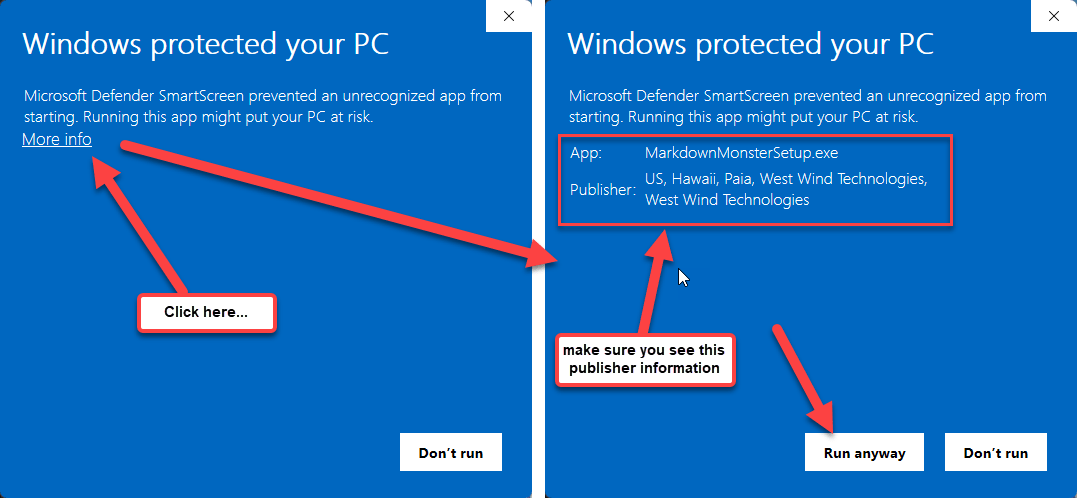
Click on the More info link, then Run anyway...
+++ Rick ---
I know how to get past this. Was just mentioning to you in case that was helpful. 😃
I also have a vague recollection of some relatively recent commentary from you about issues with Let's Encrypt certs? But I could be hallucinating.
When I get the next update, I'll grab some screenshots if I hit this again. Only if it's useful for you, of course.
FWIW my dev VM version of Windows is Windows 2022 Datacenter so the screenshots you're seeing are most likely different as I assume you're using W10/11.
Created a quick blog post and linked it from the download page:
+++ Rick ---
I'm an inspiration... 😃
FWIW my dev VM version of Windows is Windows 2022 Datacenter so the screenshots you're seeing are most likely different as I assume you're using W10/11.
Actually I have to do this on my server too to get the SmartScreen dialog. On my local machine anything West Wind goes through because I install these things so often locally and otherwise.
I am curious if in some Enterprise configuration with certain lacking priviliges can't bypass via the More info link...
+++ Rick ---
I do expect my IT/DevOps folk have this VM locked down in some ways. I'll grab screenshots next time I fetch a DM update.