
 Docs and Site Folders Not Visible in Folder Browser
 David Compton
All
Jan 11, 2026 @ 12:26pm
I have just installed Markdown Monster on a new laptop. I just copied my Markdown Monster project folders from the old laptop to the new one. Now when I open a folder that contains an existing Markdown Monster project, the docs and site folders are not visible in the left hand side folder/file browser. I've tried 2 projects and I'm getting the same behaviour. Any ideas how to resolve this.

 re: Docs and Site Folders Not Visible in Folder Browser
 Rick Strahl
David Compton
Jan 11, 2026 @ 02:43pm
Not quite sure what you're asking. When you say "project" what do you mean exactly? An .mdproj file?
Or are you asking about the "Track Active Document in Folder Browser" feature? If so click on the two arrows in the Folder browser toolbar to keep the document and folder browser synced.
+++ Rick ---
re: Docs and Site Folders Not Visible in Folder Browser David Compton
Rick Strahl
Jan 11, 2026 @ 03:06pm
Hi Rick. Apologies for not being clearer. I did try just opening a folder - and I also tried opening up the existing .mdproj file. Both had the same issue.
Here is the folder that I am trying to open:
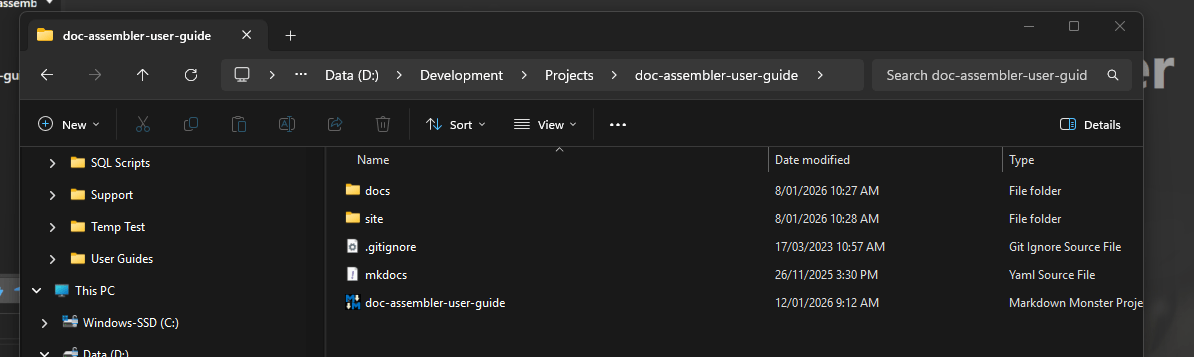
And here is what it looks like in Markdown Monster when I click the "Browse for folder" button and then select my folder:
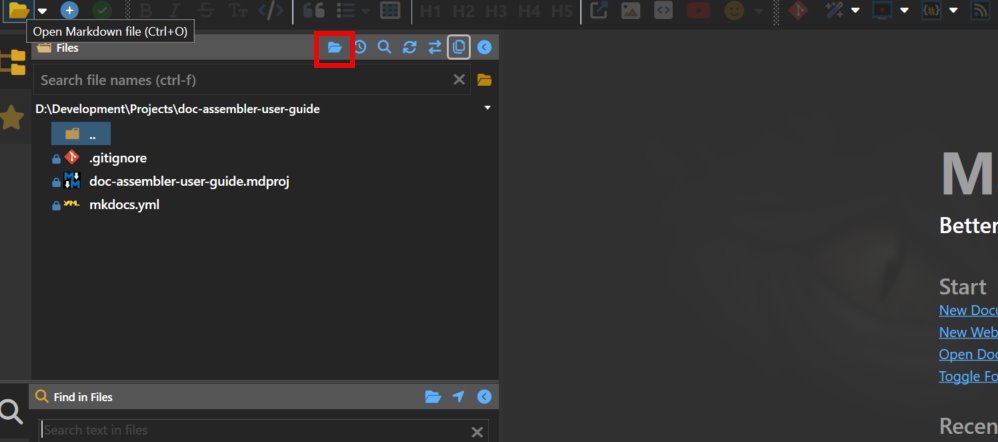
You can see that the Docs and Site sub-folders do not show up. This doesn't happen on my old laptop.
Kind regards,
David
re: Docs and Site Folders Not Visible in Folder Browser Rick Strahl
David Compton
Jan 12, 2026 @ 07:09pm
Ah yes I see what you mean. It's much broader than what your report suggests: No folders are showing at all in any folder.
That bug creeped in with a recent update meant to deal with the large volume of \.\nul\ folder errors I suspect.
Will take a look.
+++ Rick ---
 re: Docs and Site Folders Not Visible in Folder Browser
 Rick Strahl
David Compton
Jan 12, 2026 @ 10:38pm
This has been fixed in v4.0.3.6 and later...
+++ Rick ---