
 Microsoft.AspNet.SignalR.Client can not load file or assembly Newtonsoft.Json, version=6.0.0.0
 Alejandro A Sosa
All
Apr 15, 2020 @ 08:25am
Hi Rick,
I ran into the problem where "Microsoft.AspNet.SignalR.Client can not load file or assembly Newtonsoft.Json, version=6.0.0.0 etc". Found your article in https://west-wind.com/wconnect/weblog/ShowEntry.blog?id=927 in which you provide "an example of .config file that forces JSON.NET usage of any version to version 8.0:" (Minor point: seems you updated the example code to allow up to JSON.NET version 11.0.2.0 but did not change the description text).
The main question I have is, where should this xml code be placed during development, when no exe has been created? You mentioned vfp9.exe.config. I tried that but still ran into the problem.
TIA for the help,
Alex
 re: Microsoft.AspNet.SignalR.Client can not load file or assembly Newtonsoft.Json, version=6.0.0.0
 Alejandro A Sosa
Alejandro A Sosa
Apr 15, 2020 @ 10:22am
Additional information:
The error ocurred in the call loProxy.Start(toHandler) after the first hit was received, in my FUNCTION SignalRListener(tcGroup,toHandler).
*********************************************************************
* This function creates an instance of SignalRClient and returns a proxy to same
* When SignalRClient instance starts we pass the object that will serve as Callback handler
* SignalRClient joind the indicated group to receive messages
FUNCTION SignalRListener(tcGroup,toHandler)
* tcGroup = Group for messages
* toHandler = Object that will handle messages
*********************************************************************
	IF EMPTY(tcGroup)
	   tcGroup = "Rick"
	ENDIF

	* Create a SignalRClient instance to listen for messages passing object to handle callbacks (toHandler)
	DO wwDotNetBridge
	LOCAL loBridge as wwDotNetBridge
	loBridge = CreateObject("wwDotNetBridge","V4")
	loBridge.LoadAssembly("signalrclient.dll")
	loProxy = loBridge.CreateInstance("SignalRClient.SignalRClient")
	loProxy.Start(toHandler)
	loProxy.JoinGroup(tcGroup)
	RETURN loProxy
ENDFUNC
 re: Microsoft.AspNet.SignalR.Client can not load file or assembly Newtonsoft.Json, version=6.0.0.0
 Rick Strahl
Alejandro A Sosa
Apr 15, 2020 @ 06:13pm
Where to put config
Take another look at the post it's right in there:
You need to put the redirects into vfp9.exe.config for the IDE.
The trick is to find out the right assembly version to use. JSON.NET happens to use divergent file and assembly versions and if you check the file version (the version you get when you look at the file properties) it'll show the wrong version.
You can find the assembly version with a disassembler like Reflector (or JustDecompile, ILSpy, dotPeek all of which are free).
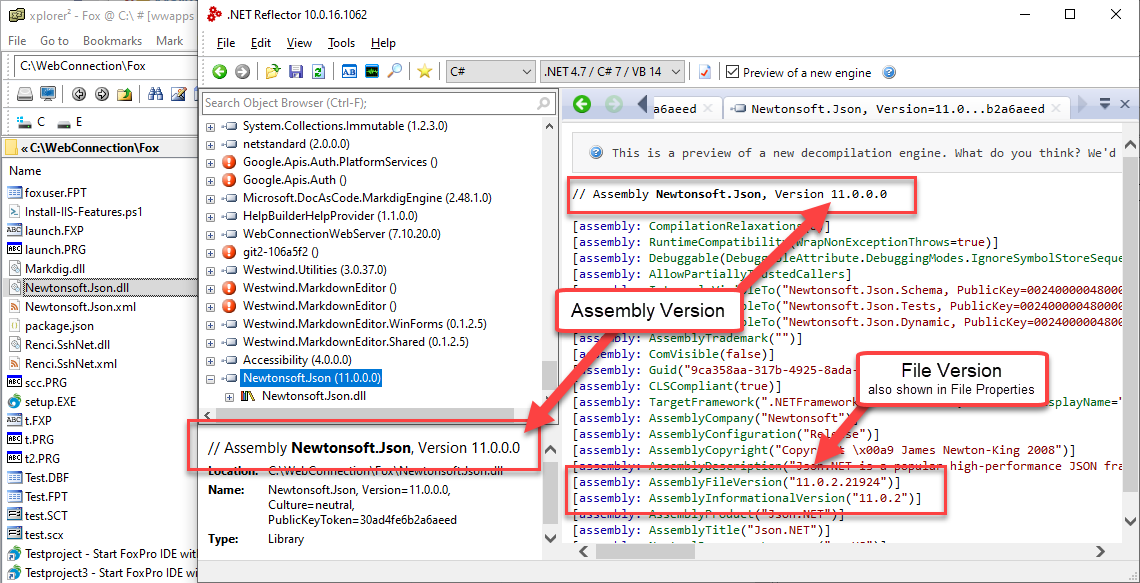
Note that the assembly version and the file version are different and the assembly version is the one you need to use - ie. 11.0.0.0.
+++ Rick ---
re: Microsoft.AspNet.SignalR.Client can not load file or assembly Newtonsoft.Json, version=6.0.0.0 Alejandro A Sosa
Rick Strahl
Apr 16, 2020 @ 09:18am
Thank you very much for your help, Rick. Finally got past that message. Phew!
Got another one, but I'll work on that on my own.
Thanks,
Alex
