

Hi Rick:
I tried to send emails via my ISP (Bell) with SendMail() and was thrown out with Error: STARTTLS statement missing.
NEED YOUR HELP: would you have a code example on how to send an email using STARTTLS. Most of my small customers use Bell and have no Website. My app has no choice but to transmit emails via Bell. Counting on you for a solution. See the bottom part which outlines the required steps.
STARTTLS
From Wikipedia, the free encyclopedia
STARTTLS is an extension to plain text communication protocols, which offers a way to upgrade a plain text connection to an encrypted (TLS or SSL) connection instead of using a separate port for encrypted communication.
STARTTLS for IMAP and POP3 is defined in RFC 2595, for SMTP in RFC 3207, for FTP in RFC 4217, for XMPP in RFC 6120, for LDAP in RFC 2830, and for NNTP in RFC 4642.
Layering[edit]
TLS is application-neutral; in the words of RFC 5246
One advantage of TLS is that it is application protocol independent. Higher-level protocols can layer on top of the TLS protocol transparently. The TLS standard, however, does not specify how protocols add security with TLS; the decisions on how to initiate TLS handshaking and how to interpret the authentication certificates exchanged are left to the judgment of the designers and implementors of protocols that run on top of TLS.[1]
The style used to specify how to use TLS matches the same layer distinction that is also conveniently supported by several library implementations of TLS. E.g., the RFC 3207 SMTP extension illustrates with the following dialog how a client and server can start a secure session:[2]
S: <waits for connection on TCP port 25>
C: <opens connection>
S: 220 mail.example.org ESMTP service ready
C: EHLO client.example.org
S: 250-mail.example.org offers a warm hug of welcome
S: 250 STARTTLS
C: STARTTLS
S: 220 Go ahead
C: <starts TLS negotiation>
C & S: <negotiate a TLS session>
C & S: <check result of negotiation>
C: EHLO client.example.org[3]
. . .


You need to use .NET mode.
Here's the documentation to send email with SSL (you have to uncomment the SSL related code):
http://www.west-wind.com/webconnection/wwClient_docs/?page=_s9001zxj2.htm
+++ Rick ---
user Id: 48402E1U
Hi Rick:
I tried to send emails via my ISP (Bell) with SendMail() and was thrown out with Error: STARTTLS statement missing.
NEED YOUR HELP: would you have a code example on how to send an email using STARTTLS. Most of my small customers use Bell and have no Website. My app has no choice but to transmit emails via Bell. Counting on you for a solution. See the bottom part which outlines the required steps.
STARTTLS
From Wikipedia, the free encyclopedia
STARTTLS is an extension to plain text communication protocols, which offers a way to upgrade a plain text connection to an encrypted (TLS or SSL) connection instead of using a separate port for encrypted communication.
STARTTLS for IMAP and POP3 is defined in RFC 2595, for SMTP in RFC 3207, for FTP in RFC 4217, for XMPP in RFC 6120, for LDAP in RFC 2830, and for NNTP in RFC 4642.
Layering[edit]
TLS is application-neutral; in the words of RFC 5246
One advantage of TLS is that it is application protocol independent. Higher-level protocols can layer on top of the TLS protocol transparently. The TLS standard, however, does not specify how protocols add security with TLS; the decisions on how to initiate TLS handshaking and how to interpret the authentication certificates exchanged are left to the judgment of the designers and implementors of protocols that run on top of TLS.[1]
The style used to specify how to use TLS matches the same layer distinction that is also conveniently supported by several library implementations of TLS. E.g., the RFC 3207 SMTP extension illustrates with the following dialog how a client and server can start a secure session:[2]
S: <waits for connection on TCP port 25>
C: <opens connection>
S: 220 mail.example.org ESMTP service ready
C: EHLO client.example.org
S: 250-mail.example.org offers a warm hug of welcome
S: 250 STARTTLS
C: STARTTLS
S: 220 Go ahead
C: <starts TLS negotiation>
C & S: <negotiate a TLS session>
C & S: <check result of negotiation>
C: EHLO client.example.org[3]
. . .
West Wind Technologies
Making waves on the Web
from Maui

Mail Error:The SMTP server requires a secure connection or the client was not authenticated.
The server response was: 5.7.0 Must issue a STARTTLS command first. b192sm30355683oih.4 - gsmtp
Don Tanner
You need to use .NET mode.
Here's the documentation to send email with SSL (you have to uncomment the SSL related code):
http://www.west-wind.com/webconnection/wwClient_docs/?page=_s9001zxj2.htm
+++ Rick ---
user Id: 48402E1U
Hi Rick:
I tried to send emails via my ISP (Bell) with SendMail() and was thrown out with Error: STARTTLS statement missing.
NEED YOUR HELP: would you have a code example on how to send an email using STARTTLS. Most of my small customers use Bell and have no Website. My app has no choice but to transmit emails via Bell. Counting on you for a solution. See the bottom part which outlines the required steps.
STARTTLS
From Wikipedia, the free encyclopedia
STARTTLS is an extension to plain text communication protocols, which offers a way to upgrade a plain text connection to an encrypted (TLS or SSL) connection instead of using a separate port for encrypted communication.
STARTTLS for IMAP and POP3 is defined in RFC 2595, for SMTP in RFC 3207, for FTP in RFC 4217, for XMPP in RFC 6120, for LDAP in RFC 2830, and for NNTP in RFC 4642.
Layering[edit]
TLS is application-neutral; in the words of RFC 5246
One advantage of TLS is that it is application protocol independent. Higher-level protocols can layer on top of the TLS protocol transparently. The TLS standard, however, does not specify how protocols add security with TLS; the decisions on how to initiate TLS handshaking and how to interpret the authentication certificates exchanged are left to the judgment of the designers and implementors of protocols that run on top of TLS.[1]
The style used to specify how to use TLS matches the same layer distinction that is also conveniently supported by several library implementations of TLS. E.g., the RFC 3207 SMTP extension illustrates with the following dialog how a client and server can start a secure session:[2]
S: <waits for connection on TCP port 25>
C: <opens connection>
S: 220 mail.example.org ESMTP service ready
C: EHLO client.example.org
S: 250-mail.example.org offers a warm hug of welcome
S: 250 STARTTLS
C: STARTTLS
S: 220 Go ahead
C: <starts TLS negotiation>
C & S: <negotiate a TLS session>
C & S: <check result of negotiation>
C: EHLO client.example.org[3]
. . .
The sample definitely works with GMail.
Please post your code.
+++ Rick ---
I am having the same problem trying to send through Gmail. I have un-commented the SSL settings but get this error and am using the .net mode
Mail Error:The SMTP server requires a secure connection or the client was not authenticated.
The server response was: 5.7.0 Must issue a STARTTLS command first. b192sm30355683oih.4 - gsmtp
Don Tanner
You need to use .NET mode.
Here's the documentation to send email with SSL (you have to uncomment the SSL related code):
http://www.west-wind.com/webconnection/wwClient_docs/?page=_s9001zxj2.htm
+++ Rick ---
user Id: 48402E1U
Hi Rick:
I tried to send emails via my ISP (Bell) with SendMail() and was thrown out with Error: STARTTLS statement missing.
NEED YOUR HELP: would you have a code example on how to send an email using STARTTLS. Most of my small customers use Bell and have no Website. My app has no choice but to transmit emails via Bell. Counting on you for a solution. See the bottom part which outlines the required steps.
STARTTLS
From Wikipedia, the free encyclopedia
STARTTLS is an extension to plain text communication protocols, which offers a way to upgrade a plain text connection to an encrypted (TLS or SSL) connection instead of using a separate port for encrypted communication.
STARTTLS for IMAP and POP3 is defined in RFC 2595, for SMTP in RFC 3207, for FTP in RFC 4217, for XMPP in RFC 6120, for LDAP in RFC 2830, and for NNTP in RFC 4642.
Layering[edit]
TLS is application-neutral; in the words of RFC 5246
One advantage of TLS is that it is application protocol independent. Higher-level protocols can layer on top of the TLS protocol transparently. The TLS standard, however, does not specify how protocols add security with TLS; the decisions on how to initiate TLS handshaking and how to interpret the authentication certificates exchanged are left to the judgment of the designers and implementors of protocols that run on top of TLS.[1]
The style used to specify how to use TLS matches the same layer distinction that is also conveniently supported by several library implementations of TLS. E.g., the RFC 3207 SMTP extension illustrates with the following dialog how a client and server can start a secure session:[2]
S: <waits for connection on TCP port 25>
C: <opens connection>
S: 220 mail.example.org ESMTP service ready
C: EHLO client.example.org
S: 250-mail.example.org offers a warm hug of welcome
S: 250 STARTTLS
C: STARTTLS
S: 220 Go ahead
C: <starts TLS negotiation>
C & S: <negotiate a TLS session>
C & S: <check result of negotiation>
C: EHLO client.example.org[3]
. . .
West Wind Technologies
Making waves on the Web
from Hood River

Mail sending failed: The SMTP server requires a secure connection or the client was not authenticated. The server response was: 5.5.1 Authentication Required. Learn more at
i then changed the account number to the gmail account to the one i was going to use and got the same error.
Don Tanner
LOCAL loSmtpCLEAR
*** Load required libraries
DO wwSmtpLOCAL loSmtp as wwSmtp
loSmtp = CREATEOBJECT("wwSmtp")*** Select mail mode. 0 - .NET wwSmtp 2 - Classic wwIPstuff
*** Note: Mode 2 only supports SendMail and SendMailAsync
*** and no support for alternate views
loSmtp.nMailMode = 0*** Google SMTP server - requires login and SSL/TLS
loSmtp.cMailServer = "smtp.gmail.com:587"*** Timeout in seconds
loSmtp.nTimeout = 25*** Optionally use SSL/TLS if the mail server requires it
loSmtp.lUseSsl = .T.*** Optionally specify user name and password
*loSmtp.cUsername = "yourusername"
*loSmtp.cPassword = "seekrit!"*!* loSmtp.cUsername = "rstrahl13"
*!* loSmtp.cPassword = "wwind0water"
loSmtp.cUsername = "xxxxxxxx"
loSmtp.cPassword = "yyyyyyy"loSmtp.cSenderName= "xxxxxx"
loSmtp.cSenderEmail = "yyyyyyy"*** The following are all comma delimited recipient lists of email addresses
*** you can optionally use "Name" <email@address.com> as the format to
*** have a display name
loSmtp.cRecipient = ["dontanner" <don@csisoftworx.com>]loSmtp.cRecipient = ["Rick Strhal" <rstrahl@west-wind.com>]
*** Optional CC and BCC lists or recipients
*loSmtp.cCCList = ["Bill" <billyboy@mydomain.com>,frankie@mydomain.com]
*loSmtp.cCCList = [billyboy@mydomain.com>]*** Actual message properties
loSmtp.cSubject = "Test Message through wwIPstuff"
loSmtp.cMessage = "<b>Test message from wwsmtp, to check out how this operation works.</b>"*** If cMessage contains HTML set cContentType to text/html
loSmtp.cContentType = "text/html"*** Optional properties
loSmtp.cReplyTo = "james@mydomain.com"
loSmtp.cPriority = "High"*** To add attachments use Attachment and point at a full file path
*loSmtp.AddAttachment("c:\photos\sailbig.jpg")
*loSmtp.AddAttachment("c:\photos\sailbig_original.jpg","image/jpeg")
*** Add any custom headers that properties don't cover
loSmtp.AddHeader("x-mailer","My Custom Smtp Client V1.01")
*** Adding an alternate view allows embedding images into the message
*!* LOCAL loAlternateView as AlternateView
*!* loAlternateView = CREATEOBJECT("wwSmtpAlternateView")
*!* loAlternateView.cText = "<b>Hello</b> World! <img src='cid:sailbig' />"
*!* loAlternateView.cContentType = "text/html"
*!* loAlternateView.AddLinkedResource("c:\sailbig.jpg","image/jpeg","sailbig")
*!* loSmtp.AddAlternateView( loAlternateView )*** Single Mail Sending - connect/disconnect for message
#IF .T.
llResult = loSmtp.Sendmail()
IF llResult
WAIT WINDOW "Mail sent..." nowait
ELSE
? "Mail sending failed: "
? loSmtp.cErrorMsg
_cliptext = "Mail sending failed: "+loSmtp.cErrorMsg
ENDIF
#ENDIF*** Multiple Mail Sending - send multiple messages on a single connection
*** this is faster if sending many messages.
*** First send connects to server
*** and connection stays open until Close is called
#IF .F.
*** Must manually connect first
loSmtp.Connect()*** Send first recipient
?loSmtp.SendMessage("jjimy44@hotmail.com","","")
? loSmtp.cErrorMsg*** Send second recipient
?loSmtp.SendMessage("jjimmy45@hotmail.com","","")
? loSmtp.cErrorMsg*** Must close connection
loSmtp.Close()
#ENDIF? "Done..."
Hi Don,
The sample definitely works with GMail.
Please post your code.
+++ Rick ---
I am having the same problem trying to send through Gmail. I have un-commented the SSL settings but get this error and am using the .net mode
Mail Error:The SMTP server requires a secure connection or the client was not authenticated.
The server response was: 5.7.0 Must issue a STARTTLS command first. b192sm30355683oih.4 - gsmtp
Don Tanner
You need to use .NET mode.
Here's the documentation to send email with SSL (you have to uncomment the SSL related code):
http://www.west-wind.com/webconnection/wwClient_docs/?page=_s9001zxj2.htm
+++ Rick ---
user Id: 48402E1U
Hi Rick:
I tried to send emails via my ISP (Bell) with SendMail() and was thrown out with Error: STARTTLS statement missing.
NEED YOUR HELP: would you have a code example on how to send an email using STARTTLS. Most of my small customers use Bell and have no Website. My app has no choice but to transmit emails via Bell. Counting on you for a solution. See the bottom part which outlines the required steps.
STARTTLS
From Wikipedia, the free encyclopedia
STARTTLS is an extension to plain text communication protocols, which offers a way to upgrade a plain text connection to an encrypted (TLS or SSL) connection instead of using a separate port for encrypted communication.
STARTTLS for IMAP and POP3 is defined in RFC 2595, for SMTP in RFC 3207, for FTP in RFC 4217, for XMPP in RFC 6120, for LDAP in RFC 2830, and for NNTP in RFC 4642.
Layering[edit]
TLS is application-neutral; in the words of RFC 5246
One advantage of TLS is that it is application protocol independent. Higher-level protocols can layer on top of the TLS protocol transparently. The TLS standard, however, does not specify how protocols add security with TLS; the decisions on how to initiate TLS handshaking and how to interpret the authentication certificates exchanged are left to the judgment of the designers and implementors of protocols that run on top of TLS.[1]
The style used to specify how to use TLS matches the same layer distinction that is also conveniently supported by several library implementations of TLS. E.g., the RFC 3207 SMTP extension illustrates with the following dialog how a client and server can start a secure session:[2]
S: <waits for connection on TCP port 25>
C: <opens connection>
S: 220 mail.example.org ESMTP service ready
C: EHLO client.example.org
S: 250-mail.example.org offers a warm hug of welcome
S: 250 STARTTLS
C: STARTTLS
S: 220 Go ahead
C: <starts TLS negotiation>
C & S: <negotiate a TLS session>
C & S: <check result of negotiation>
C: EHLO client.example.org[3]
. . .
As the error message says: Make sure that the username and password are correct. If they don't match you also get this (somewhat misleading) error message (from .NET's mail client).
+++ Rick ---
i used your sample and got the following error:
Mail sending failed: The SMTP server requires a secure connection or the client was not authenticated. The server response was: 5.5.1 Authentication Required. Learn more at
i then changed the account number to the gmail account to the one i was going to use and got the same error.
Don Tanner
LOCAL loSmtpCLEAR
*** Load required libraries
DO wwSmtpLOCAL loSmtp as wwSmtp
loSmtp = CREATEOBJECT("wwSmtp")*** Select mail mode. 0 - .NET wwSmtp 2 - Classic wwIPstuff
*** Note: Mode 2 only supports SendMail and SendMailAsync
*** and no support for alternate views
loSmtp.nMailMode = 0*** Google SMTP server - requires login and SSL/TLS
loSmtp.cMailServer = "smtp.gmail.com:587"*** Timeout in seconds
loSmtp.nTimeout = 25*** Optionally use SSL/TLS if the mail server requires it
loSmtp.lUseSsl = .T.*** Optionally specify user name and password
*loSmtp.cUsername = "yourusername"
*loSmtp.cPassword = "seekrit!"*!* loSmtp.cUsername = "rstrahl13"
*!* loSmtp.cPassword = "wwind0water"
loSmtp.cUsername = "xxxxxxxx"
loSmtp.cPassword = "yyyyyyy"loSmtp.cSenderName= "xxxxxx"
loSmtp.cSenderEmail = "yyyyyyy"*** The following are all comma delimited recipient lists of email addresses
*** you can optionally use "Name" <email@address.com> as the format to
*** have a display name
loSmtp.cRecipient = ["dontanner" <don@csisoftworx.com>]loSmtp.cRecipient = ["Rick Strhal" <rstrahl@west-wind.com>]
*** Optional CC and BCC lists or recipients
*loSmtp.cCCList = ["Bill" <billyboy@mydomain.com>,frankie@mydomain.com]
*loSmtp.cCCList = [billyboy@mydomain.com>]*** Actual message properties
loSmtp.cSubject = "Test Message through wwIPstuff"
loSmtp.cMessage = "<b>Test message from wwsmtp, to check out how this operation works.</b>"*** If cMessage contains HTML set cContentType to text/html
loSmtp.cContentType = "text/html"*** Optional properties
loSmtp.cReplyTo = "james@mydomain.com"
loSmtp.cPriority = "High"*** To add attachments use Attachment and point at a full file path
*loSmtp.AddAttachment("c:\photos\sailbig.jpg")
*loSmtp.AddAttachment("c:\photos\sailbig_original.jpg","image/jpeg")
*** Add any custom headers that properties don't cover
loSmtp.AddHeader("x-mailer","My Custom Smtp Client V1.01")
*** Adding an alternate view allows embedding images into the message
*!* LOCAL loAlternateView as AlternateView
*!* loAlternateView = CREATEOBJECT("wwSmtpAlternateView")
*!* loAlternateView.cText = "<b>Hello</b> World! <img src='cid:sailbig' />"
*!* loAlternateView.cContentType = "text/html"
*!* loAlternateView.AddLinkedResource("c:\sailbig.jpg","image/jpeg","sailbig")
*!* loSmtp.AddAlternateView( loAlternateView )*** Single Mail Sending - connect/disconnect for message
#IF .T.
llResult = loSmtp.Sendmail()
IF llResult
WAIT WINDOW "Mail sent..." nowait
ELSE
? "Mail sending failed: "
? loSmtp.cErrorMsg
_cliptext = "Mail sending failed: "+loSmtp.cErrorMsg
ENDIF
#ENDIF*** Multiple Mail Sending - send multiple messages on a single connection
*** this is faster if sending many messages.
*** First send connects to server
*** and connection stays open until Close is called
#IF .F.
*** Must manually connect first
loSmtp.Connect()*** Send first recipient
?loSmtp.SendMessage("jjimy44@hotmail.com","","")
? loSmtp.cErrorMsg*** Send second recipient
?loSmtp.SendMessage("jjimmy45@hotmail.com","","")
? loSmtp.cErrorMsg*** Must close connection
loSmtp.Close()
#ENDIF? "Done..."
Hi Don,
The sample definitely works with GMail.
Please post your code.
+++ Rick ---
I am having the same problem trying to send through Gmail. I have un-commented the SSL settings but get this error and am using the .net mode
Mail Error:The SMTP server requires a secure connection or the client was not authenticated.
The server response was: 5.7.0 Must issue a STARTTLS command first. b192sm30355683oih.4 - gsmtp
Don Tanner
You need to use .NET mode.
Here's the documentation to send email with SSL (you have to uncomment the SSL related code):
http://www.west-wind.com/webconnection/wwClient_docs/?page=_s9001zxj2.htm
+++ Rick ---
user Id: 48402E1U
Hi Rick:
I tried to send emails via my ISP (Bell) with SendMail() and was thrown out with Error: STARTTLS statement missing.
NEED YOUR HELP: would you have a code example on how to send an email using STARTTLS. Most of my small customers use Bell and have no Website. My app has no choice but to transmit emails via Bell. Counting on you for a solution. See the bottom part which outlines the required steps.
STARTTLS
From Wikipedia, the free encyclopedia
STARTTLS is an extension to plain text communication protocols, which offers a way to upgrade a plain text connection to an encrypted (TLS or SSL) connection instead of using a separate port for encrypted communication.
STARTTLS for IMAP and POP3 is defined in RFC 2595, for SMTP in RFC 3207, for FTP in RFC 4217, for XMPP in RFC 6120, for LDAP in RFC 2830, and for NNTP in RFC 4642.
Layering[edit]
TLS is application-neutral; in the words of RFC 5246
One advantage of TLS is that it is application protocol independent. Higher-level protocols can layer on top of the TLS protocol transparently. The TLS standard, however, does not specify how protocols add security with TLS; the decisions on how to initiate TLS handshaking and how to interpret the authentication certificates exchanged are left to the judgment of the designers and implementors of protocols that run on top of TLS.[1]
The style used to specify how to use TLS matches the same layer distinction that is also conveniently supported by several library implementations of TLS. E.g., the RFC 3207 SMTP extension illustrates with the following dialog how a client and server can start a secure session:[2]
S: <waits for connection on TCP port 25>
C: <opens connection>
S: 220 mail.example.org ESMTP service ready
C: EHLO client.example.org
S: 250-mail.example.org offers a warm hug of welcome
S: 250 STARTTLS
C: STARTTLS
S: 220 Go ahead
C: <starts TLS negotiation>
C & S: <negotiate a TLS session>
C & S: <check result of negotiation>
C: EHLO client.example.org[3]
. . .
West Wind Technologies
Making waves on the Web
from Maui
thanks,
Don
Ok so I just double checked and it works for me...
As the error message says: Make sure that the username and password are correct. If they don't match you also get this (somewhat misleading) error message (from .NET's mail client).
+++ Rick ---
i used your sample and got the following error:
Mail sending failed: The SMTP server requires a secure connection or the client was not authenticated. The server response was: 5.5.1 Authentication Required. Learn more at
i then changed the account number to the gmail account to the one i was going to use and got the same error.
Don Tanner
LOCAL loSmtpCLEAR
*** Load required libraries
DO wwSmtpLOCAL loSmtp as wwSmtp
loSmtp = CREATEOBJECT("wwSmtp")*** Select mail mode. 0 - .NET wwSmtp 2 - Classic wwIPstuff
*** Note: Mode 2 only supports SendMail and SendMailAsync
*** and no support for alternate views
loSmtp.nMailMode = 0*** Google SMTP server - requires login and SSL/TLS
loSmtp.cMailServer = "smtp.gmail.com:587"*** Timeout in seconds
loSmtp.nTimeout = 25*** Optionally use SSL/TLS if the mail server requires it
loSmtp.lUseSsl = .T.*** Optionally specify user name and password
*loSmtp.cUsername = "yourusername"
*loSmtp.cPassword = "seekrit!"*!* loSmtp.cUsername = "rstrahl13"
*!* loSmtp.cPassword = "wwind0water"
loSmtp.cUsername = "xxxxxxxx"
loSmtp.cPassword = "yyyyyyy"loSmtp.cSenderName= "xxxxxx"
loSmtp.cSenderEmail = "yyyyyyy"*** The following are all comma delimited recipient lists of email addresses
*** you can optionally use "Name" <email@address.com> as the format to
*** have a display name
loSmtp.cRecipient = ["dontanner" <don@csisoftworx.com>]loSmtp.cRecipient = ["Rick Strhal" <rstrahl@west-wind.com>]
*** Optional CC and BCC lists or recipients
*loSmtp.cCCList = ["Bill" <billyboy@mydomain.com>,frankie@mydomain.com]
*loSmtp.cCCList = [billyboy@mydomain.com>]*** Actual message properties
loSmtp.cSubject = "Test Message through wwIPstuff"
loSmtp.cMessage = "<b>Test message from wwsmtp, to check out how this operation works.</b>"*** If cMessage contains HTML set cContentType to text/html
loSmtp.cContentType = "text/html"*** Optional properties
loSmtp.cReplyTo = "james@mydomain.com"
loSmtp.cPriority = "High"*** To add attachments use Attachment and point at a full file path
*loSmtp.AddAttachment("c:\photos\sailbig.jpg")
*loSmtp.AddAttachment("c:\photos\sailbig_original.jpg","image/jpeg")
*** Add any custom headers that properties don't cover
loSmtp.AddHeader("x-mailer","My Custom Smtp Client V1.01")
*** Adding an alternate view allows embedding images into the message
*!* LOCAL loAlternateView as AlternateView
*!* loAlternateView = CREATEOBJECT("wwSmtpAlternateView")
*!* loAlternateView.cText = "<b>Hello</b> World! <img src='cid:sailbig' />"
*!* loAlternateView.cContentType = "text/html"
*!* loAlternateView.AddLinkedResource("c:\sailbig.jpg","image/jpeg","sailbig")
*!* loSmtp.AddAlternateView( loAlternateView )*** Single Mail Sending - connect/disconnect for message
#IF .T.
llResult = loSmtp.Sendmail()
IF llResult
WAIT WINDOW "Mail sent..." nowait
ELSE
? "Mail sending failed: "
? loSmtp.cErrorMsg
_cliptext = "Mail sending failed: "+loSmtp.cErrorMsg
ENDIF
#ENDIF*** Multiple Mail Sending - send multiple messages on a single connection
*** this is faster if sending many messages.
*** First send connects to server
*** and connection stays open until Close is called
#IF .F.
*** Must manually connect first
loSmtp.Connect()*** Send first recipient
?loSmtp.SendMessage("jjimy44@hotmail.com","","")
? loSmtp.cErrorMsg*** Send second recipient
?loSmtp.SendMessage("jjimmy45@hotmail.com","","")
? loSmtp.cErrorMsg*** Must close connection
loSmtp.Close()
#ENDIF? "Done..."
Hi Don,
The sample definitely works with GMail.
Please post your code.
+++ Rick ---
I am having the same problem trying to send through Gmail. I have un-commented the SSL settings but get this error and am using the .net mode
Mail Error:The SMTP server requires a secure connection or the client was not authenticated.
The server response was: 5.7.0 Must issue a STARTTLS command first. b192sm30355683oih.4 - gsmtp
Don Tanner
You need to use .NET mode.
Here's the documentation to send email with SSL (you have to uncomment the SSL related code):
http://www.west-wind.com/webconnection/wwClient_docs/?page=_s9001zxj2.htm
+++ Rick ---
user Id: 48402E1U
Hi Rick:
I tried to send emails via my ISP (Bell) with SendMail() and was thrown out with Error: STARTTLS statement missing.
NEED YOUR HELP: would you have a code example on how to send an email using STARTTLS. Most of my small customers use Bell and have no Website. My app has no choice but to transmit emails via Bell. Counting on you for a solution. See the bottom part which outlines the required steps.
STARTTLS
From Wikipedia, the free encyclopedia
STARTTLS is an extension to plain text communication protocols, which offers a way to upgrade a plain text connection to an encrypted (TLS or SSL) connection instead of using a separate port for encrypted communication.
STARTTLS for IMAP and POP3 is defined in RFC 2595, for SMTP in RFC 3207, for FTP in RFC 4217, for XMPP in RFC 6120, for LDAP in RFC 2830, and for NNTP in RFC 4642.
Layering[edit]
TLS is application-neutral; in the words of RFC 5246
One advantage of TLS is that it is application protocol independent. Higher-level protocols can layer on top of the TLS protocol transparently. The TLS standard, however, does not specify how protocols add security with TLS; the decisions on how to initiate TLS handshaking and how to interpret the authentication certificates exchanged are left to the judgment of the designers and implementors of protocols that run on top of TLS.[1]
The style used to specify how to use TLS matches the same layer distinction that is also conveniently supported by several library implementations of TLS. E.g., the RFC 3207 SMTP extension illustrates with the following dialog how a client and server can start a secure session:[2]
S: <waits for connection on TCP port 25>
C: <opens connection>
S: 220 mail.example.org ESMTP service ready
C: EHLO client.example.org
S: 250-mail.example.org offers a warm hug of welcome
S: 250 STARTTLS
C: STARTTLS
S: 220 Go ahead
C: <starts TLS negotiation>
C & S: <negotiate a TLS session>
C & S: <check result of negotiation>
C: EHLO client.example.org[3]
. . .
thanks,
Don
So your email login was not current? I just ran the sample as it was at first. If it is not, i will test tomorrow as it is not my account. I don't have a Gmail account yet.
thanks,
Don
Ok so I just double checked and it works for me...
As the error message says: Make sure that the username and password are correct. If they don't match you also get this (somewhat misleading) error message (from .NET's mail client).
+++ Rick ---
i used your sample and got the following error:
Mail sending failed: The SMTP server requires a secure connection or the client was not authenticated. The server response was: 5.5.1 Authentication Required. Learn more at
i then changed the account number to the gmail account to the one i was going to use and got the same error.
Don Tanner
LOCAL loSmtpCLEAR
*** Load required libraries
DO wwSmtpLOCAL loSmtp as wwSmtp
loSmtp = CREATEOBJECT("wwSmtp")*** Select mail mode. 0 - .NET wwSmtp 2 - Classic wwIPstuff
*** Note: Mode 2 only supports SendMail and SendMailAsync
*** and no support for alternate views
loSmtp.nMailMode = 0*** Google SMTP server - requires login and SSL/TLS
loSmtp.cMailServer = "smtp.gmail.com:587"*** Timeout in seconds
loSmtp.nTimeout = 25*** Optionally use SSL/TLS if the mail server requires it
loSmtp.lUseSsl = .T.*** Optionally specify user name and password
*loSmtp.cUsername = "yourusername"
*loSmtp.cPassword = "seekrit!"*!* loSmtp.cUsername = "rstrahl13"
*!* loSmtp.cPassword = "wwind0water"
loSmtp.cUsername = "xxxxxxxx"
loSmtp.cPassword = "yyyyyyy"loSmtp.cSenderName= "xxxxxx"
loSmtp.cSenderEmail = "yyyyyyy"*** The following are all comma delimited recipient lists of email addresses
*** you can optionally use "Name" <email@address.com> as the format to
*** have a display name
loSmtp.cRecipient = ["dontanner" <don@csisoftworx.com>]loSmtp.cRecipient = ["Rick Strhal" <rstrahl@west-wind.com>]
*** Optional CC and BCC lists or recipients
*loSmtp.cCCList = ["Bill" <billyboy@mydomain.com>,frankie@mydomain.com]
*loSmtp.cCCList = [billyboy@mydomain.com>]*** Actual message properties
loSmtp.cSubject = "Test Message through wwIPstuff"
loSmtp.cMessage = "<b>Test message from wwsmtp, to check out how this operation works.</b>"*** If cMessage contains HTML set cContentType to text/html
loSmtp.cContentType = "text/html"*** Optional properties
loSmtp.cReplyTo = "james@mydomain.com"
loSmtp.cPriority = "High"*** To add attachments use Attachment and point at a full file path
*loSmtp.AddAttachment("c:\photos\sailbig.jpg")
*loSmtp.AddAttachment("c:\photos\sailbig_original.jpg","image/jpeg")
*** Add any custom headers that properties don't cover
loSmtp.AddHeader("x-mailer","My Custom Smtp Client V1.01")
*** Adding an alternate view allows embedding images into the message
*!* LOCAL loAlternateView as AlternateView
*!* loAlternateView = CREATEOBJECT("wwSmtpAlternateView")
*!* loAlternateView.cText = "<b>Hello</b> World! <img src='cid:sailbig' />"
*!* loAlternateView.cContentType = "text/html"
*!* loAlternateView.AddLinkedResource("c:\sailbig.jpg","image/jpeg","sailbig")
*!* loSmtp.AddAlternateView( loAlternateView )*** Single Mail Sending - connect/disconnect for message
#IF .T.
llResult = loSmtp.Sendmail()
IF llResult
WAIT WINDOW "Mail sent..." nowait
ELSE
? "Mail sending failed: "
? loSmtp.cErrorMsg
_cliptext = "Mail sending failed: "+loSmtp.cErrorMsg
ENDIF
#ENDIF*** Multiple Mail Sending - send multiple messages on a single connection
*** this is faster if sending many messages.
*** First send connects to server
*** and connection stays open until Close is called
#IF .F.
*** Must manually connect first
loSmtp.Connect()*** Send first recipient
?loSmtp.SendMessage("jjimy44@hotmail.com","","")
? loSmtp.cErrorMsg*** Send second recipient
?loSmtp.SendMessage("jjimmy45@hotmail.com","","")
? loSmtp.cErrorMsg*** Must close connection
loSmtp.Close()
#ENDIF? "Done..."
Hi Don,
The sample definitely works with GMail.
Please post your code.
+++ Rick ---
I am having the same problem trying to send through Gmail. I have un-commented the SSL settings but get this error and am using the .net mode
Mail Error:The SMTP server requires a secure connection or the client was not authenticated.
The server response was: 5.7.0 Must issue a STARTTLS command first. b192sm30355683oih.4 - gsmtp
Don Tanner
You need to use .NET mode.
Here's the documentation to send email with SSL (you have to uncomment the SSL related code):
http://www.west-wind.com/webconnection/wwClient_docs/?page=_s9001zxj2.htm
+++ Rick ---
user Id: 48402E1U
Hi Rick:
I tried to send emails via my ISP (Bell) with SendMail() and was thrown out with Error: STARTTLS statement missing.
NEED YOUR HELP: would you have a code example on how to send an email using STARTTLS. Most of my small customers use Bell and have no Website. My app has no choice but to transmit emails via Bell. Counting on you for a solution. See the bottom part which outlines the required steps.
STARTTLS
From Wikipedia, the free encyclopedia
STARTTLS is an extension to plain text communication protocols, which offers a way to upgrade a plain text connection to an encrypted (TLS or SSL) connection instead of using a separate port for encrypted communication.
STARTTLS for IMAP and POP3 is defined in RFC 2595, for SMTP in RFC 3207, for FTP in RFC 4217, for XMPP in RFC 6120, for LDAP in RFC 2830, and for NNTP in RFC 4642.
Layering[edit]
TLS is application-neutral; in the words of RFC 5246
One advantage of TLS is that it is application protocol independent. Higher-level protocols can layer on top of the TLS protocol transparently. The TLS standard, however, does not specify how protocols add security with TLS; the decisions on how to initiate TLS handshaking and how to interpret the authentication certificates exchanged are left to the judgment of the designers and implementors of protocols that run on top of TLS.[1]
The style used to specify how to use TLS matches the same layer distinction that is also conveniently supported by several library implementations of TLS. E.g., the RFC 3207 SMTP extension illustrates with the following dialog how a client and server can start a secure session:[2]
S: <waits for connection on TCP port 25>
C: <opens connection>
S: 220 mail.example.org ESMTP service ready
C: EHLO client.example.org
S: 250-mail.example.org offers a warm hug of welcome
S: 250 STARTTLS
C: STARTTLS
S: 220 Go ahead
C: <starts TLS negotiation>
C & S: <negotiate a TLS session>
C & S: <check result of negotiation>
C: EHLO client.example.org[3]
. . .


Unable to Load wwDotNetBridge (dll is located in Path)
Please advise
Hi Don,
The sample definitely works with GMail.
Please post your code.
+++ Rick ---
I am having the same problem trying to send through Gmail. I have un-commented the SSL settings but get this error and am using the .net mode
Mail Error:The SMTP server requires a secure connection or the client was not authenticated.
The server response was: 5.7.0 Must issue a STARTTLS command first. b192sm30355683oih.4 - gsmtp
Don Tanner
You need to use .NET mode.
Here's the documentation to send email with SSL (you have to uncomment the SSL related code):
http://www.west-wind.com/webconnection/wwClient_docs/?page=_s9001zxj2.htm
+++ Rick ---
user Id: 48402E1U
Hi Rick:
I tried to send emails via my ISP (Bell) with SendMail() and was thrown out with Error: STARTTLS statement missing.
NEED YOUR HELP: would you have a code example on how to send an email using STARTTLS. Most of my small customers use Bell and have no Website. My app has no choice but to transmit emails via Bell. Counting on you for a solution. See the bottom part which outlines the required steps.
STARTTLS
From Wikipedia, the free encyclopedia
STARTTLS is an extension to plain text communication protocols, which offers a way to upgrade a plain text connection to an encrypted (TLS or SSL) connection instead of using a separate port for encrypted communication.
STARTTLS for IMAP and POP3 is defined in RFC 2595, for SMTP in RFC 3207, for FTP in RFC 4217, for XMPP in RFC 6120, for LDAP in RFC 2830, and for NNTP in RFC 4642.
Layering[edit]
TLS is application-neutral; in the words of RFC 5246
One advantage of TLS is that it is application protocol independent. Higher-level protocols can layer on top of the TLS protocol transparently. The TLS standard, however, does not specify how protocols add security with TLS; the decisions on how to initiate TLS handshaking and how to interpret the authentication certificates exchanged are left to the judgment of the designers and implementors of protocols that run on top of TLS.[1]
The style used to specify how to use TLS matches the same layer distinction that is also conveniently supported by several library implementations of TLS. E.g., the RFC 3207 SMTP extension illustrates with the following dialog how a client and server can start a secure session:[2]
S: <waits for connection on TCP port 25>
C: <opens connection>
S: 220 mail.example.org ESMTP service ready
C: EHLO client.example.org
S: 250-mail.example.org offers a warm hug of welcome
S: 250 STARTTLS
C: STARTTLS
S: 220 Go ahead
C: <starts TLS negotiation>
C & S: <negotiate a TLS session>
C & S: <check result of negotiation>
C: EHLO client.example.org[3]
. . .
You need to have .NET installed most likely...
Here's more info on a few things that you can check:
http://www.west-wind.com/webconnection/docs/?page=_3rf12jtma.htm
+++ Rick ---
When adding SSL code and attempting to Send Mail via G-Mail am receiving an Error Message:
Unable to Load wwDotNetBridge (dll is located in Path)
Please advise
Hi Don,
The sample definitely works with GMail.
Please post your code.
+++ Rick ---
I am having the same problem trying to send through Gmail. I have un-commented the SSL settings but get this error and am using the .net mode
Mail Error:The SMTP server requires a secure connection or the client was not authenticated.
The server response was: 5.7.0 Must issue a STARTTLS command first. b192sm30355683oih.4 - gsmtp
Don Tanner
You need to use .NET mode.
Here's the documentation to send email with SSL (you have to uncomment the SSL related code):
http://www.west-wind.com/webconnection/wwClient_docs/?page=_s9001zxj2.htm
+++ Rick ---
user Id: 48402E1U
Hi Rick:
I tried to send emails via my ISP (Bell) with SendMail() and was thrown out with Error: STARTTLS statement missing.
NEED YOUR HELP: would you have a code example on how to send an email using STARTTLS. Most of my small customers use Bell and have no Website. My app has no choice but to transmit emails via Bell. Counting on you for a solution. See the bottom part which outlines the required steps.
STARTTLS
From Wikipedia, the free encyclopedia
STARTTLS is an extension to plain text communication protocols, which offers a way to upgrade a plain text connection to an encrypted (TLS or SSL) connection instead of using a separate port for encrypted communication.
STARTTLS for IMAP and POP3 is defined in RFC 2595, for SMTP in RFC 3207, for FTP in RFC 4217, for XMPP in RFC 6120, for LDAP in RFC 2830, and for NNTP in RFC 4642.
Layering[edit]
TLS is application-neutral; in the words of RFC 5246
One advantage of TLS is that it is application protocol independent. Higher-level protocols can layer on top of the TLS protocol transparently. The TLS standard, however, does not specify how protocols add security with TLS; the decisions on how to initiate TLS handshaking and how to interpret the authentication certificates exchanged are left to the judgment of the designers and implementors of protocols that run on top of TLS.[1]
The style used to specify how to use TLS matches the same layer distinction that is also conveniently supported by several library implementations of TLS. E.g., the RFC 3207 SMTP extension illustrates with the following dialog how a client and server can start a secure session:[2]
S: <waits for connection on TCP port 25>
C: <opens connection>
S: 220 mail.example.org ESMTP service ready
C: EHLO client.example.org
S: 250-mail.example.org offers a warm hug of welcome
S: 250 STARTTLS
C: STARTTLS
S: 220 Go ahead
C: <starts TLS negotiation>
C & S: <negotiate a TLS session>
C & S: <check result of negotiation>
C: EHLO client.example.org[3]
. . .
West Wind Technologies
Making waves on the Web
from Maui
Here's my NET Folder:
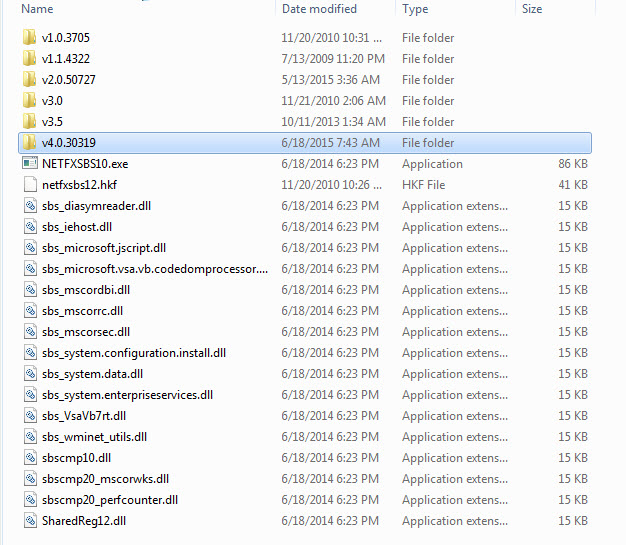
When I run oDotNetBridge = CREATEOBJECT("Westwind.wwDotNetBridge") from the command Line I get a Message that the Class Definition is not found.
You need to have .NET installed most likely...
Here's more info on a few things that you can check:
http://www.west-wind.com/webconnection/docs/?page=_3rf12jtma.htm
+++ Rick ---
When adding SSL code and attempting to Send Mail via G-Mail am receiving an Error Message:
Unable to Load wwDotNetBridge (dll is located in Path)
Please advise
Hi Don,
The sample definitely works with GMail.
Please post your code.
+++ Rick ---
I am having the same problem trying to send through Gmail. I have un-commented the SSL settings but get this error and am using the .net mode
Mail Error:The SMTP server requires a secure connection or the client was not authenticated.
The server response was: 5.7.0 Must issue a STARTTLS command first. b192sm30355683oih.4 - gsmtp
Don Tanner
You need to use .NET mode.
Here's the documentation to send email with SSL (you have to uncomment the SSL related code):
http://www.west-wind.com/webconnection/wwClient_docs/?page=_s9001zxj2.htm
+++ Rick ---
user Id: 48402E1U
Hi Rick:
I tried to send emails via my ISP (Bell) with SendMail() and was thrown out with Error: STARTTLS statement missing.
NEED YOUR HELP: would you have a code example on how to send an email using STARTTLS. Most of my small customers use Bell and have no Website. My app has no choice but to transmit emails via Bell. Counting on you for a solution. See the bottom part which outlines the required steps.
STARTTLS
From Wikipedia, the free encyclopedia
STARTTLS is an extension to plain text communication protocols, which offers a way to upgrade a plain text connection to an encrypted (TLS or SSL) connection instead of using a separate port for encrypted communication.
STARTTLS for IMAP and POP3 is defined in RFC 2595, for SMTP in RFC 3207, for FTP in RFC 4217, for XMPP in RFC 6120, for LDAP in RFC 2830, and for NNTP in RFC 4642.
Layering[edit]
TLS is application-neutral; in the words of RFC 5246
One advantage of TLS is that it is application protocol independent. Higher-level protocols can layer on top of the TLS protocol transparently. The TLS standard, however, does not specify how protocols add security with TLS; the decisions on how to initiate TLS handshaking and how to interpret the authentication certificates exchanged are left to the judgment of the designers and implementors of protocols that run on top of TLS.[1]
The style used to specify how to use TLS matches the same layer distinction that is also conveniently supported by several library implementations of TLS. E.g., the RFC 3207 SMTP extension illustrates with the following dialog how a client and server can start a secure session:[2]
S: <waits for connection on TCP port 25>
C: <opens connection>
S: 220 mail.example.org ESMTP service ready
C: EHLO client.example.org
S: 250-mail.example.org offers a warm hug of welcome
S: 250 STARTTLS
C: STARTTLS
S: 220 Go ahead
C: <starts TLS negotiation>
C & S: <negotiate a TLS session>
C & S: <check result of negotiation>
C: EHLO client.example.org[3]
. . .
Marshal
You need to have .NET installed most likely...
Here's more info on a few things that you can check:
http://www.west-wind.com/webconnection/docs/?page=_3rf12jtma.htm
+++ Rick ---
When adding SSL code and attempting to Send Mail via G-Mail am receiving an Error Message:
Unable to Load wwDotNetBridge (dll is located in Path)
Please advise
Hi Don,
The sample definitely works with GMail.
Please post your code.
+++ Rick ---
I am having the same problem trying to send through Gmail. I have un-commented the SSL settings but get this error and am using the .net mode
Mail Error:The SMTP server requires a secure connection or the client was not authenticated.
The server response was: 5.7.0 Must issue a STARTTLS command first. b192sm30355683oih.4 - gsmtp
Don Tanner
You need to use .NET mode.
Here's the documentation to send email with SSL (you have to uncomment the SSL related code):
http://www.west-wind.com/webconnection/wwClient_docs/?page=_s9001zxj2.htm
+++ Rick ---
user Id: 48402E1U
Hi Rick:
I tried to send emails via my ISP (Bell) with SendMail() and was thrown out with Error: STARTTLS statement missing.
NEED YOUR HELP: would you have a code example on how to send an email using STARTTLS. Most of my small customers use Bell and have no Website. My app has no choice but to transmit emails via Bell. Counting on you for a solution. See the bottom part which outlines the required steps.
STARTTLS
From Wikipedia, the free encyclopedia
STARTTLS is an extension to plain text communication protocols, which offers a way to upgrade a plain text connection to an encrypted (TLS or SSL) connection instead of using a separate port for encrypted communication.
STARTTLS for IMAP and POP3 is defined in RFC 2595, for SMTP in RFC 3207, for FTP in RFC 4217, for XMPP in RFC 6120, for LDAP in RFC 2830, and for NNTP in RFC 4642.
Layering[edit]
TLS is application-neutral; in the words of RFC 5246
One advantage of TLS is that it is application protocol independent. Higher-level protocols can layer on top of the TLS protocol transparently. The TLS standard, however, does not specify how protocols add security with TLS; the decisions on how to initiate TLS handshaking and how to interpret the authentication certificates exchanged are left to the judgment of the designers and implementors of protocols that run on top of TLS.[1]
The style used to specify how to use TLS matches the same layer distinction that is also conveniently supported by several library implementations of TLS. E.g., the RFC 3207 SMTP extension illustrates with the following dialog how a client and server can start a secure session:[2]
S: <waits for connection on TCP port 25>
C: <opens connection>
S: 220 mail.example.org ESMTP service ready
C: EHLO client.example.org
S: 250-mail.example.org offers a warm hug of welcome
S: 250 STARTTLS
C: STARTTLS
S: 220 Go ahead
C: <starts TLS negotiation>
C & S: <negotiate a TLS session>
C & S: <check result of negotiation>
C: EHLO client.example.org[3]
. . .
The way to make sure is to install the latest version of .NET which is 4.5.2 (if you're not on XP - on XP 4.0 is the last supported version).
Other than that it could be permissions but it's hard to know since you're not getting a secondary error message from the failure.
+++ Rick ---
Checked in the Registry - see that I have both Version 4 (Client & Full) and 4.0 (Client only Installed). Could this be causing the problem?
Marshal
You need to have .NET installed most likely...
Here's more info on a few things that you can check:
http://www.west-wind.com/webconnection/docs/?page=_3rf12jtma.htm
+++ Rick ---
When adding SSL code and attempting to Send Mail via G-Mail am receiving an Error Message:
Unable to Load wwDotNetBridge (dll is located in Path)
Please advise
Hi Don,
The sample definitely works with GMail.
Please post your code.
+++ Rick ---
I am having the same problem trying to send through Gmail. I have un-commented the SSL settings but get this error and am using the .net mode
Mail Error:The SMTP server requires a secure connection or the client was not authenticated.
The server response was: 5.7.0 Must issue a STARTTLS command first. b192sm30355683oih.4 - gsmtp
Don Tanner
You need to use .NET mode.
Here's the documentation to send email with SSL (you have to uncomment the SSL related code):
http://www.west-wind.com/webconnection/wwClient_docs/?page=_s9001zxj2.htm
+++ Rick ---
user Id: 48402E1U
Hi Rick:
I tried to send emails via my ISP (Bell) with SendMail() and was thrown out with Error: STARTTLS statement missing.
NEED YOUR HELP: would you have a code example on how to send an email using STARTTLS. Most of my small customers use Bell and have no Website. My app has no choice but to transmit emails via Bell. Counting on you for a solution. See the bottom part which outlines the required steps.
STARTTLS
From Wikipedia, the free encyclopedia
STARTTLS is an extension to plain text communication protocols, which offers a way to upgrade a plain text connection to an encrypted (TLS or SSL) connection instead of using a separate port for encrypted communication.
STARTTLS for IMAP and POP3 is defined in RFC 2595, for SMTP in RFC 3207, for FTP in RFC 4217, for XMPP in RFC 6120, for LDAP in RFC 2830, and for NNTP in RFC 4642.
Layering[edit]
TLS is application-neutral; in the words of RFC 5246
One advantage of TLS is that it is application protocol independent. Higher-level protocols can layer on top of the TLS protocol transparently. The TLS standard, however, does not specify how protocols add security with TLS; the decisions on how to initiate TLS handshaking and how to interpret the authentication certificates exchanged are left to the judgment of the designers and implementors of protocols that run on top of TLS.[1]
The style used to specify how to use TLS matches the same layer distinction that is also conveniently supported by several library implementations of TLS. E.g., the RFC 3207 SMTP extension illustrates with the following dialog how a client and server can start a secure session:[2]
S: <waits for connection on TCP port 25>
C: <opens connection>
S: 220 mail.example.org ESMTP service ready
C: EHLO client.example.org
S: 250-mail.example.org offers a warm hug of welcome
S: 250 STARTTLS
C: STARTTLS
S: 220 Go ahead
C: <starts TLS negotiation>
C & S: <negotiate a TLS session>
C & S: <check result of negotiation>
C: EHLO client.example.org[3]
. . .
West Wind Technologies
Making waves on the Web
from Hood River
A couple of questions:
1. OK to install the latest version 4.5.2 without uninstalling the earlier Versions?
2. Don't see any specific code in wwDotNetBridge which references version 4.5.2. Is there a more recent version of WWIPStuff?
Marshal
Possibly.
The way to make sure is to install the latest version of .NET which is 4.5.2 (if you're not on XP - on XP 4.0 is the last supported version).
Other than that it could be permissions but it's hard to know since you're not getting a secondary error message from the failure.
+++ Rick ---
Checked in the Registry - see that I have both Version 4 (Client & Full) and 4.0 (Client only Installed). Could this be causing the problem?
Marshal
You need to have .NET installed most likely...
Here's more info on a few things that you can check:
http://www.west-wind.com/webconnection/docs/?page=_3rf12jtma.htm
+++ Rick ---
When adding SSL code and attempting to Send Mail via G-Mail am receiving an Error Message:
Unable to Load wwDotNetBridge (dll is located in Path)
Please advise
Hi Don,
The sample definitely works with GMail.
Please post your code.
+++ Rick ---
I am having the same problem trying to send through Gmail. I have un-commented the SSL settings but get this error and am using the .net mode
Mail Error:The SMTP server requires a secure connection or the client was not authenticated.
The server response was: 5.7.0 Must issue a STARTTLS command first. b192sm30355683oih.4 - gsmtp
Don Tanner
You need to use .NET mode.
Here's the documentation to send email with SSL (you have to uncomment the SSL related code):
http://www.west-wind.com/webconnection/wwClient_docs/?page=_s9001zxj2.htm
+++ Rick ---
user Id: 48402E1U
Hi Rick:
I tried to send emails via my ISP (Bell) with SendMail() and was thrown out with Error: STARTTLS statement missing.
NEED YOUR HELP: would you have a code example on how to send an email using STARTTLS. Most of my small customers use Bell and have no Website. My app has no choice but to transmit emails via Bell. Counting on you for a solution. See the bottom part which outlines the required steps.
STARTTLS
From Wikipedia, the free encyclopedia
STARTTLS is an extension to plain text communication protocols, which offers a way to upgrade a plain text connection to an encrypted (TLS or SSL) connection instead of using a separate port for encrypted communication.
STARTTLS for IMAP and POP3 is defined in RFC 2595, for SMTP in RFC 3207, for FTP in RFC 4217, for XMPP in RFC 6120, for LDAP in RFC 2830, and for NNTP in RFC 4642.
Layering[edit]
TLS is application-neutral; in the words of RFC 5246
One advantage of TLS is that it is application protocol independent. Higher-level protocols can layer on top of the TLS protocol transparently. The TLS standard, however, does not specify how protocols add security with TLS; the decisions on how to initiate TLS handshaking and how to interpret the authentication certificates exchanged are left to the judgment of the designers and implementors of protocols that run on top of TLS.[1]
The style used to specify how to use TLS matches the same layer distinction that is also conveniently supported by several library implementations of TLS. E.g., the RFC 3207 SMTP extension illustrates with the following dialog how a client and server can start a secure session:[2]
S: <waits for connection on TCP port 25>
C: <opens connection>
S: 220 mail.example.org ESMTP service ready
C: EHLO client.example.org
S: 250-mail.example.org offers a warm hug of welcome
S: 250 STARTTLS
C: STARTTLS
S: 220 Go ahead
C: <starts TLS negotiation>
C & S: <negotiate a TLS session>
C & S: <check result of negotiation>
C: EHLO client.example.org[3]
. . .
But yes, I would recommend you install the latest version especially if you've been using an older one. There was a short stretch in the 5.5 timeframe when there were issues with certain windows configurations not working that have been fixed in 5.60 and later I think.
WHen you have problems it's best always to try run the latest stuff first, then report what you find.
+++ Rick ---
Thanks for your replies today.
A couple of questions:
1. OK to install the latest version 4.5.2 without uninstalling the earlier Versions?
2. Don't see any specific code in wwDotNetBridge which references version 4.5.2. Is there a more recent version of WWIPStuff?
Marshal
Possibly.
The way to make sure is to install the latest version of .NET which is 4.5.2 (if you're not on XP - on XP 4.0 is the last supported version).
Other than that it could be permissions but it's hard to know since you're not getting a secondary error message from the failure.
+++ Rick ---
Checked in the Registry - see that I have both Version 4 (Client & Full) and 4.0 (Client only Installed). Could this be causing the problem?
Marshal
You need to have .NET installed most likely...
Here's more info on a few things that you can check:
http://www.west-wind.com/webconnection/docs/?page=_3rf12jtma.htm
+++ Rick ---
When adding SSL code and attempting to Send Mail via G-Mail am receiving an Error Message:
Unable to Load wwDotNetBridge (dll is located in Path)
Please advise
Hi Don,
The sample definitely works with GMail.
Please post your code.
+++ Rick ---
I am having the same problem trying to send through Gmail. I have un-commented the SSL settings but get this error and am using the .net mode
Mail Error:The SMTP server requires a secure connection or the client was not authenticated.
The server response was: 5.7.0 Must issue a STARTTLS command first. b192sm30355683oih.4 - gsmtp
Don Tanner
You need to use .NET mode.
Here's the documentation to send email with SSL (you have to uncomment the SSL related code):
http://www.west-wind.com/webconnection/wwClient_docs/?page=_s9001zxj2.htm
+++ Rick ---
user Id: 48402E1U
Hi Rick:
I tried to send emails via my ISP (Bell) with SendMail() and was thrown out with Error: STARTTLS statement missing.
NEED YOUR HELP: would you have a code example on how to send an email using STARTTLS. Most of my small customers use Bell and have no Website. My app has no choice but to transmit emails via Bell. Counting on you for a solution. See the bottom part which outlines the required steps.
STARTTLS
From Wikipedia, the free encyclopedia
STARTTLS is an extension to plain text communication protocols, which offers a way to upgrade a plain text connection to an encrypted (TLS or SSL) connection instead of using a separate port for encrypted communication.
STARTTLS for IMAP and POP3 is defined in RFC 2595, for SMTP in RFC 3207, for FTP in RFC 4217, for XMPP in RFC 6120, for LDAP in RFC 2830, and for NNTP in RFC 4642.
Layering[edit]
TLS is application-neutral; in the words of RFC 5246
One advantage of TLS is that it is application protocol independent. Higher-level protocols can layer on top of the TLS protocol transparently. The TLS standard, however, does not specify how protocols add security with TLS; the decisions on how to initiate TLS handshaking and how to interpret the authentication certificates exchanged are left to the judgment of the designers and implementors of protocols that run on top of TLS.[1]
The style used to specify how to use TLS matches the same layer distinction that is also conveniently supported by several library implementations of TLS. E.g., the RFC 3207 SMTP extension illustrates with the following dialog how a client and server can start a secure session:[2]
S: <waits for connection on TCP port 25>
C: <opens connection>
S: 220 mail.example.org ESMTP service ready
C: EHLO client.example.org
S: 250-mail.example.org offers a warm hug of welcome
S: 250 STARTTLS
C: STARTTLS
S: 220 Go ahead
C: <starts TLS negotiation>
C & S: <negotiate a TLS session>
C & S: <check result of negotiation>
C: EHLO client.example.org[3]
. . .
West Wind Technologies
Making waves on the Web
from Maui