



+++ Rick ---
Loaded web connection 5.70 onto a windows 10 m/c and i'm getting "Unable to find application WCONNECT" when I attempt to build a new project - any help appreciated
West Wind Technologies
Making waves on the Web
from Maui
Not sure. You're going to have to provide more information on what you're doing...
+++ Rick ---
Loaded web connection 5.70 onto a windows 10 m/c and i'm getting "Unable to find application WCONNECT" when I attempt to build a new project - any help appreciated
Not sure. You're going to have to provide more information on what you're doing...
+++ Rick ---
Loaded web connection 5.70 onto a windows 10 m/c and i'm getting "Unable to find application WCONNECT" when I attempt to build a new project - any help appreciated
I was doing a fresh install onto a new win 10 64bit m/c - it went through the setup as normal - used all the defaults. Hello world worked OK. Then used new project wizard to set up devdemo (exactly as tutorial) - seems to set up OK, but when compiling the project exe - comes up with "Unable to find Application WCONNECT. Replicated the setup on a server 2008 R2 computer and does exactly the same (see attached)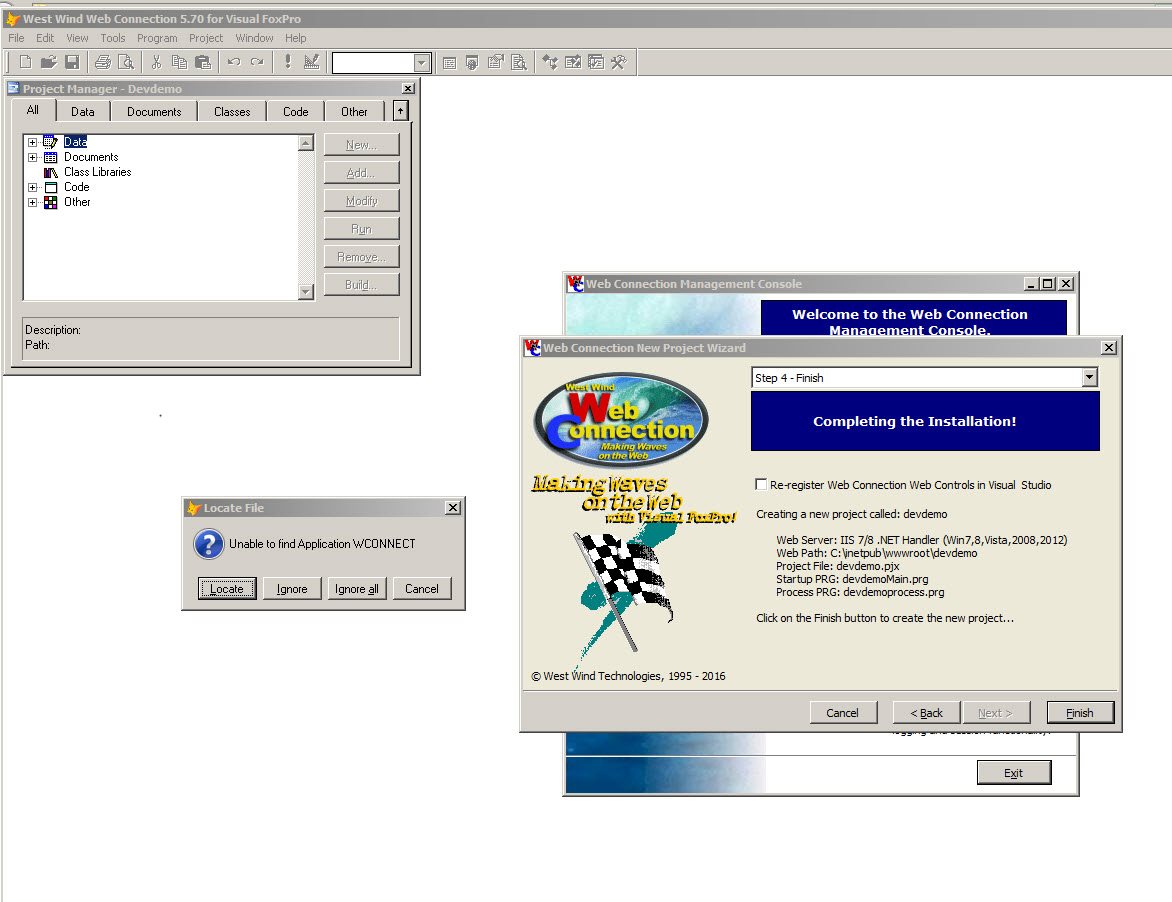
devdemo.err shows-Program c:\wconnect\devdemomain.prg has the following errors:
Application WCONNECT - Undefined
What am I doing wrong?

You are going to get errors on compile when creating a shareware version project (can't add wconnect.app to a project).
Does the app run when you do:
do devdemomain.prg
What version?
+++ Rick ---
Not sure. You're going to have to provide more information on what you're doing...
+++ Rick ---
Loaded web connection 5.70 onto a windows 10 m/c and i'm getting "Unable to find application WCONNECT" when I attempt to build a new project - any help appreciated
I was doing a fresh install onto a new win 10 64bit m/c - it went through the setup as normal - used all the defaults. Hello world worked OK. Then used new project wizard to set up devdemo (exactly as tutorial) - seems to set up OK, but when compiling the project exe - comes up with "Unable to find Application WCONNECT. Replicated the setup on a server 2008 R2 computer and does exactly the same (see attached)
devdemo.err shows-Program c:\wconnect\devdemomain.prg has the following errors:
Application WCONNECT - Undefined
What am I doing wrong?
West Wind Technologies
Making waves on the Web
from Maui
You are going to get errors on compile when creating a shareware version project (can't add wconnect.app to a project).
Does the app run when you do:
do devdemomain.prg
What version?
+++ Rick ---
Not sure. You're going to have to provide more information on what you're doing...
+++ Rick ---
Loaded web connection 5.70 onto a windows 10 m/c and i'm getting "Unable to find application WCONNECT" when I attempt to build a new project - any help appreciated
I was doing a fresh install onto a new win 10 64bit m/c - it went through the setup as normal - used all the defaults. Hello world worked OK. Then used new project wizard to set up devdemo (exactly as tutorial) - seems to set up OK, but when compiling the project exe - comes up with "Unable to find Application WCONNECT. Replicated the setup on a server 2008 R2 computer and does exactly the same (see attached)
devdemo.err shows-Program c:\wconnect\devdemomain.prg has the following errors:
Application WCONNECT - Undefined
What am I doing wrong?
Not sure then.
wconnect is either a) wconnect.prg in the classes folder in your registered version or b) wconnect.app in the shareware version. Make sure those files exist and are in your FoxPro path when you compile or run.
If you installed the shareware version then switched to the full version you have to delete wconnect.app and make sure the SHAREWARE precompiler directive is set to .F. in wconnect_override.h/wconnect.h.
+++ Rick ---
Running 5.70 - it is a fully paid version - has been live for 3/4 years on a 2012 server. Runs happily on my win 7 computer. Upgraded another win 7 computer recently to win 10 and am trying to install on this m/c
You are going to get errors on compile when creating a shareware version project (can't add wconnect.app to a project).
Does the app run when you do:
do devdemomain.prg
What version?
+++ Rick ---
Not sure. You're going to have to provide more information on what you're doing...
+++ Rick ---
Loaded web connection 5.70 onto a windows 10 m/c and i'm getting "Unable to find application WCONNECT" when I attempt to build a new project - any help appreciated
I was doing a fresh install onto a new win 10 64bit m/c - it went through the setup as normal - used all the defaults. Hello world worked OK. Then used new project wizard to set up devdemo (exactly as tutorial) - seems to set up OK, but when compiling the project exe - comes up with "Unable to find Application WCONNECT. Replicated the setup on a server 2008 R2 computer and does exactly the same (see attached)
devdemo.err shows-Program c:\wconnect\devdemomain.prg has the following errors:
Application WCONNECT - Undefined
What am I doing wrong?
West Wind Technologies
Making waves on the Web
from Maui
1- wconnect.prg exists in c:\wconnect\classes folder
2- c:\wconnect\wconnect_override.h includes nothing apart from comments
3- c:\wconnect\wconnect.h includes:-
*** VERSION CONSTANTS
#DEFINE SHAREWARE .F.
#DEFINE WWC_DEMO .T.
#DEFINE SWTIMEOUT 1800
#DEFINE HTMLCLASSONLY .F.
4- no version of wconnect.app can be found in the wconnect folder
BUT if I comment out the "If File("wconnect.app") test in devdemomain.prg and just leave the "Do wconnect" active it works and compiles the exe OK - weird!
Your comment please
Brian
Not sure then.
wconnect is either a) wconnect.prg in the classes folder in your registered version or b) wconnect.app in the shareware version. Make sure those files exist and are in your FoxPro path when you compile or run.
If you installed the shareware version then switched to the full version you have to delete wconnect.app and make sure the SHAREWARE precompiler directive is set to .F. in wconnect_override.h/wconnect.h.
+++ Rick ---
Running 5.70 - it is a fully paid version - has been live for 3/4 years on a 2012 server. Runs happily on my win 7 computer. Upgraded another win 7 computer recently to win 10 and am trying to install on this m/c
You are going to get errors on compile when creating a shareware version project (can't add wconnect.app to a project).
Does the app run when you do:
do devdemomain.prg
What version?
+++ Rick ---
Not sure. You're going to have to provide more information on what you're doing...
+++ Rick ---
Loaded web connection 5.70 onto a windows 10 m/c and i'm getting "Unable to find application WCONNECT" when I attempt to build a new project - any help appreciated
I was doing a fresh install onto a new win 10 64bit m/c - it went through the setup as normal - used all the defaults. Hello world worked OK. Then used new project wizard to set up devdemo (exactly as tutorial) - seems to set up OK, but when compiling the project exe - comes up with "Unable to find Application WCONNECT. Replicated the setup on a server 2008 R2 computer and does exactly the same (see attached)
devdemo.err shows-Program c:\wconnect\devdemomain.prg has the following errors:
Application WCONNECT - Undefined
What am I doing wrong?
Yes the code should actually be:
IF FILE("WCONNECT.APP")
  DO ("WCONNECT.app")
ELSE
  DO WCONNECT
ENDIF
which makes the compiler not pull in the .app file explicitly. Fixed for the latest V6 build.
Thanks for the feedback,
+++ Rick ---
1- wconnect.prg exists in c:\wconnect\classes folder
2- c:\wconnect\wconnect_override.h includes nothing apart from comments
3- c:\wconnect\wconnect.h includes:-
*** VERSION CONSTANTS
#DEFINE SHAREWARE .F.
#DEFINE WWC_DEMO .T.
#DEFINE SWTIMEOUT 1800
#DEFINE HTMLCLASSONLY .F.
4- no version of wconnect.app can be found in the wconnect folder
BUT if I comment out the "If File("wconnect.app") test in devdemomain.prg and just leave the "Do wconnect" active it works and compiles the exe OK - weird!
Your comment please
Brian
Not sure then.
wconnect is either a) wconnect.prg in the classes folder in your registered version or b) wconnect.app in the shareware version. Make sure those files exist and are in your FoxPro path when you compile or run.
If you installed the shareware version then switched to the full version you have to delete wconnect.app and make sure the SHAREWARE precompiler directive is set to .F. in wconnect_override.h/wconnect.h.
+++ Rick ---
Running 5.70 - it is a fully paid version - has been live for 3/4 years on a 2012 server. Runs happily on my win 7 computer. Upgraded another win 7 computer recently to win 10 and am trying to install on this m/c
You are going to get errors on compile when creating a shareware version project (can't add wconnect.app to a project).
Does the app run when you do:
do devdemomain.prg
What version?
+++ Rick ---
Not sure. You're going to have to provide more information on what you're doing...
+++ Rick ---
Loaded web connection 5.70 onto a windows 10 m/c and i'm getting "Unable to find application WCONNECT" when I attempt to build a new project - any help appreciated
I was doing a fresh install onto a new win 10 64bit m/c - it went through the setup as normal - used all the defaults. Hello world worked OK. Then used new project wizard to set up devdemo (exactly as tutorial) - seems to set up OK, but when compiling the project exe - comes up with "Unable to find Application WCONNECT. Replicated the setup on a server 2008 R2 computer and does exactly the same (see attached)
devdemo.err shows-Program c:\wconnect\devdemomain.prg has the following errors:
Application WCONNECT - Undefined
What am I doing wrong?
West Wind Technologies
Making waves on the Web
from Maui
Double click on the booking_page.prg and it launches foxpro as normal.
Any ideas
Brian
Hmmm...
Yes the code should actually be:
IF FILE("WCONNECT.APP")
  DO ("WCONNECT.app")
ELSE
  DO WCONNECT
ENDIF
which makes the compiler not pull in the .app file explicitly. Fixed for the latest V6 build.
Thanks for the feedback,
+++ Rick ---
1- wconnect.prg exists in c:\wconnect\classes folder
2- c:\wconnect\wconnect_override.h includes nothing apart from comments
3- c:\wconnect\wconnect.h includes:-
*** VERSION CONSTANTS
#DEFINE SHAREWARE .F.
#DEFINE WWC_DEMO .T.
#DEFINE SWTIMEOUT 1800
#DEFINE HTMLCLASSONLY .F.
4- no version of wconnect.app can be found in the wconnect folder
BUT if I comment out the "If File("wconnect.app") test in devdemomain.prg and just leave the "Do wconnect" active it works and compiles the exe OK - weird!
Your comment please
Brian
Not sure then.
wconnect is either a) wconnect.prg in the classes folder in your registered version or b) wconnect.app in the shareware version. Make sure those files exist and are in your FoxPro path when you compile or run.
If you installed the shareware version then switched to the full version you have to delete wconnect.app and make sure the SHAREWARE precompiler directive is set to .F. in wconnect_override.h/wconnect.h.
+++ Rick ---
Running 5.70 - it is a fully paid version - has been live for 3/4 years on a 2012 server. Runs happily on my win 7 computer. Upgraded another win 7 computer recently to win 10 and am trying to install on this m/c
You are going to get errors on compile when creating a shareware version project (can't add wconnect.app to a project).
Does the app run when you do:
do devdemomain.prg
What version?
+++ Rick ---
Not sure. You're going to have to provide more information on what you're doing...
+++ Rick ---
Loaded web connection 5.70 onto a windows 10 m/c and i'm getting "Unable to find application WCONNECT" when I attempt to build a new project - any help appreciated
I was doing a fresh install onto a new win 10 64bit m/c - it went through the setup as normal - used all the defaults. Hello world worked OK. Then used new project wizard to set up devdemo (exactly as tutorial) - seems to set up OK, but when compiling the project exe - comes up with "Unable to find Application WCONNECT. Replicated the setup on a server 2008 R2 computer and does exactly the same (see attached)
devdemo.err shows-Program c:\wconnect\devdemomain.prg has the following errors:
Application WCONNECT - Undefined
What am I doing wrong?
Make sure that the path in the page is correct in the GeneratedSourceFile attribute, and make sure that web.config has these keys:
<add key="FoxProjectBasePath" value="c:\WebConnectionProjects\wwDemo\" />
<add key="WebProjectBasePath" value="c:\WebConnection\Web\wconnect60\" />
<add key="WebProjectVirtual" value="http://localhost/wconnect60" />
set correctly. These values determine where the plug-in looks for source files and if they are not right it won't find the file.
+++ Rick ---
Got another weirdo - Created another project "FcdWeb" then added a web connection page (booking_page.wc) which runs in browser OK and created booking_page.prg in wwwroot/FcdWeb directory , but "Show web connection code" link on the booking_page.wc doesnt work even though there is a prg in the directory. Tried turning uac off - but no difference.
Double click on the booking_page.prg and it launches foxpro as normal.
Any ideas
Brian
Hmmm...
Yes the code should actually be:
IF FILE("WCONNECT.APP")
  DO ("WCONNECT.app")
ELSE
  DO WCONNECT
ENDIF
which makes the compiler not pull in the .app file explicitly. Fixed for the latest V6 build.
Thanks for the feedback,
+++ Rick ---
1- wconnect.prg exists in c:\wconnect\classes folder
2- c:\wconnect\wconnect_override.h includes nothing apart from comments
3- c:\wconnect\wconnect.h includes:-
*** VERSION CONSTANTS
#DEFINE SHAREWARE .F.
#DEFINE WWC_DEMO .T.
#DEFINE SWTIMEOUT 1800
#DEFINE HTMLCLASSONLY .F.
4- no version of wconnect.app can be found in the wconnect folder
BUT if I comment out the "If File("wconnect.app") test in devdemomain.prg and just leave the "Do wconnect" active it works and compiles the exe OK - weird!
Your comment please
Brian
Not sure then.
wconnect is either a) wconnect.prg in the classes folder in your registered version or b) wconnect.app in the shareware version. Make sure those files exist and are in your FoxPro path when you compile or run.
If you installed the shareware version then switched to the full version you have to delete wconnect.app and make sure the SHAREWARE precompiler directive is set to .F. in wconnect_override.h/wconnect.h.
+++ Rick ---
Running 5.70 - it is a fully paid version - has been live for 3/4 years on a 2012 server. Runs happily on my win 7 computer. Upgraded another win 7 computer recently to win 10 and am trying to install on this m/c
You are going to get errors on compile when creating a shareware version project (can't add wconnect.app to a project).
Does the app run when you do:
do devdemomain.prg
What version?
+++ Rick ---
Not sure. You're going to have to provide more information on what you're doing...
+++ Rick ---
Loaded web connection 5.70 onto a windows 10 m/c and i'm getting "Unable to find application WCONNECT" when I attempt to build a new project - any help appreciated
I was doing a fresh install onto a new win 10 64bit m/c - it went through the setup as normal - used all the defaults. Hello world worked OK. Then used new project wizard to set up devdemo (exactly as tutorial) - seems to set up OK, but when compiling the project exe - comes up with "Unable to find Application WCONNECT. Replicated the setup on a server 2008 R2 computer and does exactly the same (see attached)
devdemo.err shows-Program c:\wconnect\devdemomain.prg has the following errors:
Application WCONNECT - Undefined
What am I doing wrong?
West Wind Technologies
Making waves on the Web
from Maui
Help!!
Make sure that the path in the page is correct in the GeneratedSourceFile attribute, and make sure that web.config has these keys:
<<span class="commands">add key="FoxProjectBasePath" value="c:\WebConnectionProjects\wwDemo\" />
<<span class="commands">add key="WebProjectBasePath" value="c:\WebConnection\Web\wconnect60\" />
<<span class="commands">add key="WebProjectVirtual" value="http://localhost/wconnect60" />
set correctly. These values determine where the plug-in looks for source files and if they are not right it won't find the file.
+++ Rick ---
Got another weirdo - Created another project "FcdWeb" then added a web connection page (booking_page.wc) which runs in browser OK and created booking_page.prg in wwwroot/FcdWeb directory , but "Show web connection code" link on the booking_page.wc doesnt work even though there is a prg in the directory. Tried turning uac off - but no difference.
Double click on the booking_page.prg and it launches foxpro as normal.
Any ideas
Brian
Hmmm...
Yes the code should actually be:
IF FILE("WCONNECT.APP")
  DO ("WCONNECT.app")
ELSE
  DO WCONNECT
ENDIF
which makes the compiler not pull in the .app file explicitly. Fixed for the latest V6 build.
Thanks for the feedback,
+++ Rick ---
1- wconnect.prg exists in c:\wconnect\classes folder
2- c:\wconnect\wconnect_override.h includes nothing apart from comments
3- c:\wconnect\wconnect.h includes:-
*** VERSION CONSTANTS
#DEFINE SHAREWARE .F.
#DEFINE WWC_DEMO .T.
#DEFINE SWTIMEOUT 1800
#DEFINE HTMLCLASSONLY .F.
4- no version of wconnect.app can be found in the wconnect folder
BUT if I comment out the "If File("wconnect.app") test in devdemomain.prg and just leave the "Do wconnect" active it works and compiles the exe OK - weird!
Your comment please
Brian
Not sure then.
wconnect is either a) wconnect.prg in the classes folder in your registered version or b) wconnect.app in the shareware version. Make sure those files exist and are in your FoxPro path when you compile or run.
If you installed the shareware version then switched to the full version you have to delete wconnect.app and make sure the SHAREWARE precompiler directive is set to .F. in wconnect_override.h/wconnect.h.
+++ Rick ---
Running 5.70 - it is a fully paid version - has been live for 3/4 years on a 2012 server. Runs happily on my win 7 computer. Upgraded another win 7 computer recently to win 10 and am trying to install on this m/c
You are going to get errors on compile when creating a shareware version project (can't add wconnect.app to a project).
Does the app run when you do:
do devdemomain.prg
What version?
+++ Rick ---
Not sure. You're going to have to provide more information on what you're doing...
+++ Rick ---
Loaded web connection 5.70 onto a windows 10 m/c and i'm getting "Unable to find application WCONNECT" when I attempt to build a new project - any help appreciated
I was doing a fresh install onto a new win 10 64bit m/c - it went through the setup as normal - used all the defaults. Hello world worked OK. Then used new project wizard to set up devdemo (exactly as tutorial) - seems to set up OK, but when compiling the project exe - comes up with "Unable to find Application WCONNECT. Replicated the setup on a server 2008 R2 computer and does exactly the same (see attached)
devdemo.err shows-Program c:\wconnect\devdemomain.prg has the following errors:
Application WCONNECT - Undefined
What am I doing wrong?
You need to set the WebProjectBasePath in your web.config file and that should point to wherever your Web folder lives.
OTOH, if this is a new project this value should have been set up by the new project wizard to point at your Web folder.
+++ Rick ---
Path in the "GeneratedSourceFileTag" is "~\Booking_Page.prg" - but if I change this to "\Booking_Page.prg" it responds with a "Couldn't load the Foxpro source file C:\wconnect\\Booking_page.prg" - so its got a path problem but my brain cant work out how to correct this to point to the inetpub directory??
Help!!
Make sure that the path in the page is correct in the GeneratedSourceFile attribute, and make sure that web.config has these keys:
<<span class="commands">add key="FoxProjectBasePath" value="c:\WebConnectionProjects\wwDemo\" />
<<span class="commands">add key="WebProjectBasePath" value="c:\WebConnection\Web\wconnect60\" />
<<span class="commands">add key="WebProjectVirtual" value="http://localhost/wconnect60" />
set correctly. These values determine where the plug-in looks for source files and if they are not right it won't find the file.
+++ Rick ---
Got another weirdo - Created another project "FcdWeb" then added a web connection page (booking_page.wc) which runs in browser OK and created booking_page.prg in wwwroot/FcdWeb directory , but "Show web connection code" link on the booking_page.wc doesnt work even though there is a prg in the directory. Tried turning uac off - but no difference.
Double click on the booking_page.prg and it launches foxpro as normal.
Any ideas
Brian
Hmmm...
Yes the code should actually be:
IF FILE("WCONNECT.APP")
  DO ("WCONNECT.app")
ELSE
  DO WCONNECT
ENDIF
which makes the compiler not pull in the .app file explicitly. Fixed for the latest V6 build.
Thanks for the feedback,
+++ Rick ---
1- wconnect.prg exists in c:\wconnect\classes folder
2- c:\wconnect\wconnect_override.h includes nothing apart from comments
3- c:\wconnect\wconnect.h includes:-
*** VERSION CONSTANTS
#DEFINE SHAREWARE .F.
#DEFINE WWC_DEMO .T.
#DEFINE SWTIMEOUT 1800
#DEFINE HTMLCLASSONLY .F.
4- no version of wconnect.app can be found in the wconnect folder
BUT if I comment out the "If File("wconnect.app") test in devdemomain.prg and just leave the "Do wconnect" active it works and compiles the exe OK - weird!
Your comment please
Brian
Not sure then.
wconnect is either a) wconnect.prg in the classes folder in your registered version or b) wconnect.app in the shareware version. Make sure those files exist and are in your FoxPro path when you compile or run.
If you installed the shareware version then switched to the full version you have to delete wconnect.app and make sure the SHAREWARE precompiler directive is set to .F. in wconnect_override.h/wconnect.h.
+++ Rick ---
Running 5.70 - it is a fully paid version - has been live for 3/4 years on a 2012 server. Runs happily on my win 7 computer. Upgraded another win 7 computer recently to win 10 and am trying to install on this m/c
You are going to get errors on compile when creating a shareware version project (can't add wconnect.app to a project).
Does the app run when you do:
do devdemomain.prg
What version?
+++ Rick ---
Not sure. You're going to have to provide more information on what you're doing...
+++ Rick ---
Loaded web connection 5.70 onto a windows 10 m/c and i'm getting "Unable to find application WCONNECT" when I attempt to build a new project - any help appreciated
I was doing a fresh install onto a new win 10 64bit m/c - it went through the setup as normal - used all the defaults. Hello world worked OK. Then used new project wizard to set up devdemo (exactly as tutorial) - seems to set up OK, but when compiling the project exe - comes up with "Unable to find Application WCONNECT. Replicated the setup on a server 2008 R2 computer and does exactly the same (see attached)
devdemo.err shows-Program c:\wconnect\devdemomain.prg has the following errors:
Application WCONNECT - Undefined
What am I doing wrong?
West Wind Technologies
Making waves on the Web
from Maui
Please note that this is a 5.70 setup (your earlier email referred to 6.0)
Brian
<?xml version="1.0"?>
<configuration>
  <configSections>
    <section name="webConnectionVisualStudio" type="System.Configuration.NameValueSectionHandler,System,Version=1.0.3300.0, Culture=neutral, PublicKeyToken=b77a5c561934e089" />
    <section name="webConnectionConfiguration" type="System.Configuration.NameValueSectionHandler,System,Version=1.0.3300.0, Culture=neutral, PublicKeyToken=b77a5c561934e089" />
    <section name="webConnectionErrorPages" type="System.Configuration.NameValueSectionHandler,System,Version=1.0.3300.0, Culture=neutral, PublicKeyToken=b77a5c561934e089" />
  </configSections>
  <appSettings>
    <add key="enableSimpleMembership" value="false" />
  </appSettings>
  <webConnectionVisualStudio>
    <!-- Configuration Settings for the Web Connection Visual Studio Add-in
  		 Not used at runtime, only at the design time -->
    <add key="FoxProjectBasePath" value="c:\wconnect\" />
    <add key="WebProjectBasePath" value="C:\inetpub\wwwroot\FcdWeb\" />
    <add key="WebProjectVirtual" value="http://localhost/FcdWeb" />
    <!-- Optional PRG launched when VFP IDE launches -->
    <add key="IdeOnLoadPrg" value="" />
    <!-- The default browser used. Blank IE Automation, otherwise specify browser exe path -->
    <add key="WebBrowser" value="" />
    <add key="WebBrowserAlternate" value="C:\Program Files (x86)\mozilla firefox\firefox.exe" />
    <!-- <add key="WebBrowserAlternate" value="C:\Program Files (x86)\Google\Chrome\Application\chrome.exe" /> -->
    <!-- The editor used to edit FoxPro code - blank means FoxPro Editor is used -->
    <add key="FoxProEditor" value="" />
    <add key="_FoxProEditorAlternate" value="C:\Program Files (x86)\pspad editor\pspad.exe" />
  </webConnectionVisualStudio>
  <webConnectionConfiguration>
    <!-- NOTE: These settings apply only to the Web Connection Managed Module! -->
    <add key="Timeout" value="90" />
    <add key="PostBufferLimit" value="0" />
    <add key="TempPath" value="C:\temp\wc\" />
    <add key="TempFilePrefix" value="WC_" />
    <add key="MessagingMechanism" value="File" />
    <add key="AdminAccount" value="ANY" />
    <add key="AdminPage" value="/wwThreads/admin/admin.aspx" />
    <add key="ExeFile" value="c:\wconnect\FcdWeb.exe" />
    <add key="UpdateFile" value="" />
    <add key="LogDetail" value="False" />
    <add key="ValidateRequest" value="False" />
    <add key="ComServerProgId" value="FcdWeb.FcdWebServer" />
    <add key="ComServerLoadingMode" value="LoadBased" />
    <add key="ServerCount" value="2" />
    <add key="AutoStartServers" value="False" />
    <add key="MessageDisplayFooter" value="Message generated by Web Connection IIS Connector Module" />
    <add key="UseCustomManifestLoading" value="False" />
    <add key="AuthenticationMode" value="Default" />
    <add key="PassAspNetContext" value="False" />
  </webConnectionConfiguration>
  <webConnectionErrorPages>
    <!-- NOTE: These settings apply only to the Web Connection Managed Module! -->
    <add key="Exception" value="" />
    <add key="OleError" value="" />
    <add key="Timeout" value="" />
    <add key="NoOutput" value="" />
    <add key="Busy" value="" />
    <add key="Maintenance" value="" />
    <add key="InvalidRequestId" value="" />
    <add key="TranmitFileFailure" value="" />
    <add key="PostBufferSize" value="" />
  </webConnectionErrorPages>
  <system.web>
    <compilation defaultLanguage="c#" debug="true">
      <!-- Build Providers enable your script extensions to be editable in Visual Studio -->
      <buildProviders>
        <add extension=".wcsx" type="System.Web.Compilation.PageBuildProvider" />
        <add extension=".wc" type="System.Web.Compilation.PageBuildProvider" />
        <add extension=".wc" type="System.Web.Compilation.PageBuildProvider" />
      </buildProviders>
    </compilation>
    <!-- Web Connection Managed Module requires that it runs in FULL TRUST (COM Interop) -->
    <trust level="Full" />
    <httpHandlers>
    </httpHandlers>
  </system.web>
  <!-- IIS 7 Script Map Configuration -->
  <system.webServer>
    <validation validateIntegratedModeConfiguration="false" />
    <!-- use this on IIS 7.5 and later to bypass IIS default Error handlers for failures -->
    <!-- httpErrors existingResponse="PassThrough" /-->
    <!-- IIS 7 Script Map Configuration -->
    <handlers>
      <add name=".wc_wconnect-module" path="*.wc" verb="*" type="Westwind.WebConnection.WebConnectionHandler,WebConnectionModule" preCondition="integratedMode" />
      <add name=".wwsoap_wconnect-module" path="*.wwsoap" verb="*" type="Westwind.WebConnection.WebConnectionHandler,WebConnectionModule" preCondition="integratedMode" />
      <add name=".wcs_wconnect-module" path="*.wcs" verb="*" type="Westwind.WebConnection.WebConnectionHandler,WebConnectionModule" preCondition="integratedMode" />
      <add name=".wcsx_wconnect-module" path="*.wcsx" verb="*" type="Westwind.WebConnection.WebConnectionHandler,WebConnectionModule" preCondition="integratedMode" />
    </handlers>
    <!--
      EXTENSIONLESS URL HANDLING
      - Requires IIS Url Rewrite Module 2.0 (Web Platform Installer)
  -->
    <!--
    <rewrite>
      <rules>
        <rule name="ExtensionLessUrls" patternSyntax="Wildcard" stopProcessing="true">
          <match url="*.*" negate="true" />
          <conditions>
            <add input="{REQUEST_FILENAME}" matchType="IsDirectory" negate="true" />
            <add input="{REQUEST_FILENAME}" matchType="IsFile" negate="true" />
          </conditions>
          <action type="Rewrite" url="UrlRewriteHandler.wc" appendQueryString="true" />
        </rule>
      </rules>
    </rewrite>
   -->
  </system.webServer>
</configuration>
You need to set the WebProjectBasePath in your web.config file and that should point to wherever your Web folder lives.
OTOH, if this is a new project this value should have been set up by the new project wizard to point at your Web folder.
+++ Rick ---
Path in the "GeneratedSourceFileTag" is "~\Booking_Page.prg" - but if I change this to "\Booking_Page.prg" it responds with a "Couldn't load the Foxpro source file C:\wconnect\\Booking_page.prg" - so its got a path problem but my brain cant work out how to correct this to point to the inetpub directory??
Help!!
Make sure that the path in the page is correct in the GeneratedSourceFile attribute, and make sure that web.config has these keys:
<<span class="commands">add key="FoxProjectBasePath" value="c:\WebConnectionProjects\wwDemo\" />
<<span class="commands">add key="WebProjectBasePath" value="c:\WebConnection\Web\wconnect60\" />
<<span class="commands">add key="WebProjectVirtual" value="http://localhost/wconnect60" />
set correctly. These values determine where the plug-in looks for source files and if they are not right it won't find the file.
+++ Rick ---
Got another weirdo - Created another project "FcdWeb" then added a web connection page (booking_page.wc) which runs in browser OK and created booking_page.prg in wwwroot/FcdWeb directory , but "Show web connection code" link on the booking_page.wc doesnt work even though there is a prg in the directory. Tried turning uac off - but no difference.
Double click on the booking_page.prg and it launches foxpro as normal.
Any ideas
Brian
Hmmm...
Yes the code should actually be:
IF FILE("WCONNECT.APP")
  DO ("WCONNECT.app")
ELSE
  DO WCONNECT
ENDIF
which makes the compiler not pull in the .app file explicitly. Fixed for the latest V6 build.
Thanks for the feedback,
+++ Rick ---
1- wconnect.prg exists in c:\wconnect\classes folder
2- c:\wconnect\wconnect_override.h includes nothing apart from comments
3- c:\wconnect\wconnect.h includes:-
*** VERSION CONSTANTS
#DEFINE SHAREWARE .F.
#DEFINE WWC_DEMO .T.
#DEFINE SWTIMEOUT 1800
#DEFINE HTMLCLASSONLY .F.
4- no version of wconnect.app can be found in the wconnect folder
BUT if I comment out the "If File("wconnect.app") test in devdemomain.prg and just leave the "Do wconnect" active it works and compiles the exe OK - weird!
Your comment please
Brian
Not sure then.
wconnect is either a) wconnect.prg in the classes folder in your registered version or b) wconnect.app in the shareware version. Make sure those files exist and are in your FoxPro path when you compile or run.
If you installed the shareware version then switched to the full version you have to delete wconnect.app and make sure the SHAREWARE precompiler directive is set to .F. in wconnect_override.h/wconnect.h.
+++ Rick ---
Running 5.70 - it is a fully paid version - has been live for 3/4 years on a 2012 server. Runs happily on my win 7 computer. Upgraded another win 7 computer recently to win 10 and am trying to install on this m/c
You are going to get errors on compile when creating a shareware version project (can't add wconnect.app to a project).
Does the app run when you do:
do devdemomain.prg
What version?
+++ Rick ---
Not sure. You're going to have to provide more information on what you're doing...
+++ Rick ---
Loaded web connection 5.70 onto a windows 10 m/c and i'm getting "Unable to find application WCONNECT" when I attempt to build a new project - any help appreciated
I was doing a fresh install onto a new win 10 64bit m/c - it went through the setup as normal - used all the defaults. Hello world worked OK. Then used new project wizard to set up devdemo (exactly as tutorial) - seems to set up OK, but when compiling the project exe - comes up with "Unable to find Application WCONNECT. Replicated the setup on a server 2008 R2 computer and does exactly the same (see attached)
devdemo.err shows-Program c:\wconnect\devdemomain.prg has the following errors:
Application WCONNECT - Undefined
What am I doing wrong?
What does the page path point to?
What version of Visual Studio? Visual Studio 2015 does not support the old plug-in. You have to use the newer plug-in, but I suspect that's not the problem because the plug-in just wouldn't be there at all.
+++ Rick ---
web.config attached below - this seems to correctly identify base path ?????????????
Please note that this is a 5.70 setup (your earlier email referred to 6.0)
Brian
<?xml version="1.0"?>
<configuration>
  <configSections>
    <section name="webConnectionVisualStudio" type="System.Configuration.NameValueSectionHandler,System,Version=1.0.3300.0, Culture=neutral, PublicKeyToken=b77a5c561934e089" />
    <section name="webConnectionConfiguration" type="System.Configuration.NameValueSectionHandler,System,Version=1.0.3300.0, Culture=neutral, PublicKeyToken=b77a5c561934e089" />
    <section name="webConnectionErrorPages" type="System.Configuration.NameValueSectionHandler,System,Version=1.0.3300.0, Culture=neutral, PublicKeyToken=b77a5c561934e089" />
  </configSections>
  <appSettings>
    <<span class="commands">add key="enableSimpleMembership" value="false" />
  </appSettings>
  <webConnectionVisualStudio>
    <!-- Configuration Settings for the Web Connection Visual Studio Add-in
  		 Not used at runtime, only at the design time -->
    <<span class="commands">add key="FoxProjectBasePath" value="c:\wconnect\" />
    <<span class="commands">add key="WebProjectBasePath" value="C:\inetpub\wwwroot\FcdWeb\" />
    <<span class="commands">add key="WebProjectVirtual" value="http://localhost/FcdWeb" />
    <!-- Optional PRG launched when VFP IDE launches -->
    <<span class="commands">add key="IdeOnLoadPrg" value="" />
    <!-- The default browser used. Blank IE Automation, otherwise specify browser exe path -->
    <<span class="commands">add key="WebBrowser" value="" />
    <<span class="commands">add key="WebBrowserAlternate" value="C:\Program Files (x86)\mozilla firefox\firefox.exe" />
    <!-- <<span class="commands">add key="WebBrowserAlternate" value="C:\Program Files (x86)\Google\Chrome\Application\chrome.exe" /> -->
    <!-- The editor used to edit FoxPro code - blank means FoxPro Editor is used -->
    <<span class="commands">add key="FoxProEditor" value="" />
    <<span class="commands">add key="_FoxProEditorAlternate" value="C:\Program Files (x86)\pspad editor\pspad.exe" />
  </webConnectionVisualStudio>
  <webConnectionConfiguration>
    <!-- NOTE: These settings apply only to the Web Connection Managed Module! -->
    <<span class="commands">add key="Timeout" value="90" />
    <<span class="commands">add key="PostBufferLimit" value="0" />
    <<span class="commands">add key="TempPath" value="C:\temp\wc\" />
    <<span class="commands">add key="TempFilePrefix" value="WC_" />
    <<span class="commands">add key="MessagingMechanism" value="File" />
    <<span class="commands">add key="AdminAccount" value="ANY" />
    <<span class="commands">add key="AdminPage" value="/wwThreads/admin/admin.aspx" />
    <<span class="commands">add key="ExeFile" value="c:\wconnect\FcdWeb.exe" />
    <<span class="commands">add key="UpdateFile" value="" />
    <<span class="commands">add key="LogDetail" value="False" />
    <<span class="commands">add key="ValidateRequest" value="False" />
    <<span class="commands">add key="ComServerProgId" value="FcdWeb.FcdWebServer" />
    <<span class="commands">add key="ComServerLoadingMode" value="LoadBased" />
    <<span class="commands">add key="ServerCount" value="2" />
    <<span class="commands">add key="AutoStartServers" value="False" />
    <<span class="commands">add key="MessageDisplayFooter" value="Message generated by Web Connection IIS Connector Module" />
    <<span class="commands">add key="UseCustomManifestLoading" value="False" />
    <<span class="commands">add key="AuthenticationMode" value="Default" />
    <<span class="commands">add key="PassAspNetContext" value="False" />
  </webConnectionConfiguration>
  <webConnectionErrorPages>
    <!-- NOTE: These settings apply only to the Web Connection Managed Module! -->
    <<span class="commands">add key="Exception" value="" />
    <<span class="commands">add key="OleError" value="" />
    <<span class="commands">add key="Timeout" value="" />
    <<span class="commands">add key="NoOutput" value="" />
    <<span class="commands">add key="Busy" value="" />
    <<span class="commands">add key="Maintenance" value="" />
    <<span class="commands">add key="InvalidRequestId" value="" />
    <<span class="commands">add key="TranmitFileFailure" value="" />
    <<span class="commands">add key="PostBufferSize" value="" />
  </webConnectionErrorPages>
  <system.web>
    <compilation defaultLanguage="c#" debug="true">
      <!-- Build Providers enable your script extensions to be editable in Visual Studio -->
      <buildProviders>
        <<span class="commands">add extension=".wcsx" type="System.Web.Compilation.PageBuildProvider" />
        <<span class="commands">add extension=".wc" type="System.Web.Compilation.PageBuildProvider" />
        <<span class="commands">add extension=".wc" type="System.Web.Compilation.PageBuildProvider" />
      </buildProviders>
    </compilation>
    <!-- Web Connection Managed Module requires that it runs in FULL TRUST (COM Interop) -->
    <trust level="Full" />
    <httpHandlers>
    </httpHandlers>
  </system.web>
  <!-- IIS 7 Script Map Configuration -->
  <system.webServer>
    <validation validateIntegratedModeConfiguration="false" />
    <!-- use this on IIS 7.5 and later to bypass IIS default Error handlers for failures -->
    <!-- httpErrors existingResponse="PassThrough" /-->
    <!-- IIS 7 Script Map Configuration -->
    <handlers>
      <<span class="commands">add name=".wc_wconnect-module" path="*.wc" verb="*" type="Westwind.WebConnection.WebConnectionHandler,WebConnectionModule" preCondition="integratedMode" />
      <<span class="commands">add name=".wwsoap_wconnect-module" path="*.wwsoap" verb="*" type="Westwind.WebConnection.WebConnectionHandler,WebConnectionModule" preCondition="integratedMode" />
      <<span class="commands">add name=".wcs_wconnect-module" path="*.wcs" verb="*" type="Westwind.WebConnection.WebConnectionHandler,WebConnectionModule" preCondition="integratedMode" />
      <<span class="commands">add name=".wcsx_wconnect-module" path="*.wcsx" verb="*" type="Westwind.WebConnection.WebConnectionHandler,WebConnectionModule" preCondition="integratedMode" />
    </handlers>
    <!--
      EXTENSIONLESS URL HANDLING
      - Requires IIS Url Rewrite Module 2.0 (Web Platform Installer)
  -->
    <!--
    <rewrite>
      <rules>
        <rule name="ExtensionLessUrls" patternSyntax="Wildcard" stopProcessing="true">
          <match url="*.*" negate="true" />
          <conditions>
            <<span class="commands">add input="{REQUEST_FILENAME}" matchType="IsDirectory" negate="true" />
            <<span class="commands">add input="{REQUEST_FILENAME}" matchType="IsFile" negate="true" />
          </conditions>
          <action type="Rewrite" url="UrlRewriteHandler.wc" appendQueryString="true" />
        </rule>
      </rules>
    </rewrite>
   -->
  </system.webServer>
</configuration>
You need to set the WebProjectBasePath in your web.config file and that should point to wherever your Web folder lives.
OTOH, if this is a new project this value should have been set up by the new project wizard to point at your Web folder.
+++ Rick ---
Path in the "GeneratedSourceFileTag" is "~\Booking_Page.prg" - but if I change this to "\Booking_Page.prg" it responds with a "Couldn't load the Foxpro source file C:\wconnect\\Booking_page.prg" - so its got a path problem but my brain cant work out how to correct this to point to the inetpub directory??
Help!!
Make sure that the path in the page is correct in the GeneratedSourceFile attribute, and make sure that web.config has these keys:
<<span class="commands">add key="FoxProjectBasePath" value="c:\WebConnectionProjects\wwDemo\" />
<<span class="commands">add key="WebProjectBasePath" value="c:\WebConnection\Web\wconnect60\" />
<<span class="commands">add key="WebProjectVirtual" value="http://localhost/wconnect60" />
set correctly. These values determine where the plug-in looks for source files and if they are not right it won't find the file.
+++ Rick ---
Got another weirdo - Created another project "FcdWeb" then added a web connection page (booking_page.wc) which runs in browser OK and created booking_page.prg in wwwroot/FcdWeb directory , but "Show web connection code" link on the booking_page.wc doesnt work even though there is a prg in the directory. Tried turning uac off - but no difference.
Double click on the booking_page.prg and it launches foxpro as normal.
Any ideas
Brian
Hmmm...
Yes the code should actually be:
IF FILE("WCONNECT.APP")
  DO ("WCONNECT.app")
ELSE
  DO WCONNECT
ENDIF
which makes the compiler not pull in the .app file explicitly. Fixed for the latest V6 build.
Thanks for the feedback,
+++ Rick ---
1- wconnect.prg exists in c:\wconnect\classes folder
2- c:\wconnect\wconnect_override.h includes nothing apart from comments
3- c:\wconnect\wconnect.h includes:-
*** VERSION CONSTANTS
#DEFINE SHAREWARE .F.
#DEFINE WWC_DEMO .T.
#DEFINE SWTIMEOUT 1800
#DEFINE HTMLCLASSONLY .F.
4- no version of wconnect.app can be found in the wconnect folder
BUT if I comment out the "If File("wconnect.app") test in devdemomain.prg and just leave the "Do wconnect" active it works and compiles the exe OK - weird!
Your comment please
Brian
Not sure then.
wconnect is either a) wconnect.prg in the classes folder in your registered version or b) wconnect.app in the shareware version. Make sure those files exist and are in your FoxPro path when you compile or run.
If you installed the shareware version then switched to the full version you have to delete wconnect.app and make sure the SHAREWARE precompiler directive is set to .F. in wconnect_override.h/wconnect.h.
+++ Rick ---
Running 5.70 - it is a fully paid version - has been live for 3/4 years on a 2012 server. Runs happily on my win 7 computer. Upgraded another win 7 computer recently to win 10 and am trying to install on this m/c
You are going to get errors on compile when creating a shareware version project (can't add wconnect.app to a project).
Does the app run when you do:
do devdemomain.prg
What version?
+++ Rick ---
Not sure. You're going to have to provide more information on what you're doing...
+++ Rick ---
Loaded web connection 5.70 onto a windows 10 m/c and i'm getting "Unable to find application WCONNECT" when I attempt to build a new project - any help appreciated
I was doing a fresh install onto a new win 10 64bit m/c - it went through the setup as normal - used all the defaults. Hello world worked OK. Then used new project wizard to set up devdemo (exactly as tutorial) - seems to set up OK, but when compiling the project exe - comes up with "Unable to find Application WCONNECT. Replicated the setup on a server 2008 R2 computer and does exactly the same (see attached)
devdemo.err shows-Program c:\wconnect\devdemomain.prg has the following errors:
Application WCONNECT - Undefined
What am I doing wrong?
West Wind Technologies
Making waves on the Web
from Maui
Where does the page actually live? In your Web folder or in the Web Connection folder?
If it's in the Web Connection folder you'd want:
GeneratedSourceFile="MyPage_Page.prg" or "SubFolder/MyPage_Page.prg".
If it's the Web Folder:
GeneratedSourceFile="/MyPage_Page.prg" or "~/SubFolder/MyPage_Page.prg".
The thing is this should be automatic when the page was created. The default in recent versions has been to put the file in the Web folder (~/MyPage.prg).
I can't check this anymore at this time as I'm running VS 2015 and the old plug-in doesn't work in that anymore but the plug-in code hasn't been touched in a really long time so I'm pretty sure this isn't broken.
The new plug-in might have an issue but in quick testing here I see it working either with files web connection folder or with files in the web folder.
One more thing - make sure there's not something locking the file. Can you open the file from the FoxPro Command Window?
+++ Rick ---
Path in the "GeneratedSourceFileTag" is "~\Booking_Page.prg" - but if I change this to "\Booking_Page.prg" it responds with a "Couldn't load the Foxpro source file C:\wconnect\\Booking_page.prg" - so its got a path problem but my brain cant work out how to correct this to point to the inetpub directory??
Help!!
Make sure that the path in the page is correct in the GeneratedSourceFile attribute, and make sure that web.config has these keys:
<<span class="commands">add key="FoxProjectBasePath" value="c:\WebConnectionProjects\wwDemo\" />
<<span class="commands">add key="WebProjectBasePath" value="c:\WebConnection\Web\wconnect60\" />
<<span class="commands">add key="WebProjectVirtual" value="http://localhost/wconnect60" />
set correctly. These values determine where the plug-in looks for source files and if they are not right it won't find the file.
+++ Rick ---
Got another weirdo - Created another project "FcdWeb" then added a web connection page (booking_page.wc) which runs in browser OK and created booking_page.prg in wwwroot/FcdWeb directory , but "Show web connection code" link on the booking_page.wc doesnt work even though there is a prg in the directory. Tried turning uac off - but no difference.
Double click on the booking_page.prg and it launches foxpro as normal.
Any ideas
Brian
Hmmm...
Yes the code should actually be:
IF FILE("WCONNECT.APP")
  DO ("WCONNECT.app")
ELSE
  DO WCONNECT
ENDIF
which makes the compiler not pull in the .app file explicitly. Fixed for the latest V6 build.
Thanks for the feedback,
+++ Rick ---
1- wconnect.prg exists in c:\wconnect\classes folder
2- c:\wconnect\wconnect_override.h includes nothing apart from comments
3- c:\wconnect\wconnect.h includes:-
*** VERSION CONSTANTS
#DEFINE SHAREWARE .F.
#DEFINE WWC_DEMO .T.
#DEFINE SWTIMEOUT 1800
#DEFINE HTMLCLASSONLY .F.
4- no version of wconnect.app can be found in the wconnect folder
BUT if I comment out the "If File("wconnect.app") test in devdemomain.prg and just leave the "Do wconnect" active it works and compiles the exe OK - weird!
Your comment please
Brian
Not sure then.
wconnect is either a) wconnect.prg in the classes folder in your registered version or b) wconnect.app in the shareware version. Make sure those files exist and are in your FoxPro path when you compile or run.
If you installed the shareware version then switched to the full version you have to delete wconnect.app and make sure the SHAREWARE precompiler directive is set to .F. in wconnect_override.h/wconnect.h.
+++ Rick ---
Running 5.70 - it is a fully paid version - has been live for 3/4 years on a 2012 server. Runs happily on my win 7 computer. Upgraded another win 7 computer recently to win 10 and am trying to install on this m/c
You are going to get errors on compile when creating a shareware version project (can't add wconnect.app to a project).
Does the app run when you do:
do devdemomain.prg
What version?
+++ Rick ---
Not sure. You're going to have to provide more information on what you're doing...
+++ Rick ---
Loaded web connection 5.70 onto a windows 10 m/c and i'm getting "Unable to find application WCONNECT" when I attempt to build a new project - any help appreciated
I was doing a fresh install onto a new win 10 64bit m/c - it went through the setup as normal - used all the defaults. Hello world worked OK. Then used new project wizard to set up devdemo (exactly as tutorial) - seems to set up OK, but when compiling the project exe - comes up with "Unable to find Application WCONNECT. Replicated the setup on a server 2008 R2 computer and does exactly the same (see attached)
devdemo.err shows-Program c:\wconnect\devdemomain.prg has the following errors:
Application WCONNECT - Undefined
What am I doing wrong?
West Wind Technologies
Making waves on the Web
from Maui
1-Identical setup on a 2008r2 server works
2- If I change the config basepath entry to say c:\inetpub\wwroot\ I get a "Couldn't load the Foxpro source file" error - whereas I get nothing if it points correctly to the wwroot\fcdWeb\ folder
3- Also the "want to generate the PRG file now" option on the error doesnt do anything
Using vs 2012
Regards
Brian
What does the page path point to?
What version of Visual Studio? Visual Studio 2015 does not support the old plug-in. You have to use the newer plug-in, but I suspect that's not the problem because the plug-in just wouldn't be there at all.
+++ Rick ---
web.config attached below - this seems to correctly identify base path ?????????????
Please note that this is a 5.70 setup (your earlier email referred to 6.0)
Brian
<?xml version="1.0"?>
<configuration>
  <configSections>
    <section name="webConnectionVisualStudio" type="System.Configuration.NameValueSectionHandler,System,Version=1.0.3300.0, Culture=neutral, PublicKeyToken=b77a5c561934e089" />
    <section name="webConnectionConfiguration" type="System.Configuration.NameValueSectionHandler,System,Version=1.0.3300.0, Culture=neutral, PublicKeyToken=b77a5c561934e089" />
    <section name="webConnectionErrorPages" type="System.Configuration.NameValueSectionHandler,System,Version=1.0.3300.0, Culture=neutral, PublicKeyToken=b77a5c561934e089" />
  </configSections>
  <appSettings>
    <<span class="commands">add key="enableSimpleMembership" value="false" />
  </appSettings>
  <webConnectionVisualStudio>
    <!-- Configuration Settings for the Web Connection Visual Studio Add-in
  		 Not used at runtime, only at the design time -->
    <<span class="commands">add key="FoxProjectBasePath" value="c:\wconnect\" />
    <<span class="commands">add key="WebProjectBasePath" value="C:\inetpub\wwwroot\FcdWeb\" />
    <<span class="commands">add key="WebProjectVirtual" value="http://localhost/FcdWeb" />
    <!-- Optional PRG launched when VFP IDE launches -->
    <<span class="commands">add key="IdeOnLoadPrg" value="" />
    <!-- The default browser used. Blank IE Automation, otherwise specify browser exe path -->
    <<span class="commands">add key="WebBrowser" value="" />
    <<span class="commands">add key="WebBrowserAlternate" value="C:\Program Files (x86)\mozilla firefox\firefox.exe" />
    <!-- <<span class="commands">add key="WebBrowserAlternate" value="C:\Program Files (x86)\Google\Chrome\Application\chrome.exe" /> -->
    <!-- The editor used to edit FoxPro code - blank means FoxPro Editor is used -->
    <<span class="commands">add key="FoxProEditor" value="" />
    <<span class="commands">add key="_FoxProEditorAlternate" value="C:\Program Files (x86)\pspad editor\pspad.exe" />
  </webConnectionVisualStudio>
  <webConnectionConfiguration>
    <!-- NOTE: These settings apply only to the Web Connection Managed Module! -->
    <<span class="commands">add key="Timeout" value="90" />
    <<span class="commands">add key="PostBufferLimit" value="0" />
    <<span class="commands">add key="TempPath" value="C:\temp\wc\" />
    <<span class="commands">add key="TempFilePrefix" value="WC_" />
    <<span class="commands">add key="MessagingMechanism" value="File" />
    <<span class="commands">add key="AdminAccount" value="ANY" />
    <<span class="commands">add key="AdminPage" value="/wwThreads/admin/admin.aspx" />
    <<span class="commands">add key="ExeFile" value="c:\wconnect\FcdWeb.exe" />
    <<span class="commands">add key="UpdateFile" value="" />
    <<span class="commands">add key="LogDetail" value="False" />
    <<span class="commands">add key="ValidateRequest" value="False" />
    <<span class="commands">add key="ComServerProgId" value="FcdWeb.FcdWebServer" />
    <<span class="commands">add key="ComServerLoadingMode" value="LoadBased" />
    <<span class="commands">add key="ServerCount" value="2" />
    <<span class="commands">add key="AutoStartServers" value="False" />
    <<span class="commands">add key="MessageDisplayFooter" value="Message generated by Web Connection IIS Connector Module" />
    <<span class="commands">add key="UseCustomManifestLoading" value="False" />
    <<span class="commands">add key="AuthenticationMode" value="Default" />
    <<span class="commands">add key="PassAspNetContext" value="False" />
  </webConnectionConfiguration>
  <webConnectionErrorPages>
    <!-- NOTE: These settings apply only to the Web Connection Managed Module! -->
    <<span class="commands">add key="Exception" value="" />
    <<span class="commands">add key="OleError" value="" />
    <<span class="commands">add key="Timeout" value="" />
    <<span class="commands">add key="NoOutput" value="" />
    <<span class="commands">add key="Busy" value="" />
    <<span class="commands">add key="Maintenance" value="" />
    <<span class="commands">add key="InvalidRequestId" value="" />
    <<span class="commands">add key="TranmitFileFailure" value="" />
    <<span class="commands">add key="PostBufferSize" value="" />
  </webConnectionErrorPages>
  <system.web>
    <compilation defaultLanguage="c#" debug="true">
      <!-- Build Providers enable your script extensions to be editable in Visual Studio -->
      <buildProviders>
        <<span class="commands">add extension=".wcsx" type="System.Web.Compilation.PageBuildProvider" />
        <<span class="commands">add extension=".wc" type="System.Web.Compilation.PageBuildProvider" />
        <<span class="commands">add extension=".wc" type="System.Web.Compilation.PageBuildProvider" />
      </buildProviders>
    </compilation>
    <!-- Web Connection Managed Module requires that it runs in FULL TRUST (COM Interop) -->
    <trust level="Full" />
    <httpHandlers>
    </httpHandlers>
  </system.web>
  <!-- IIS 7 Script Map Configuration -->
  <system.webServer>
    <validation validateIntegratedModeConfiguration="false" />
    <!-- use this on IIS 7.5 and later to bypass IIS default Error handlers for failures -->
    <!-- httpErrors existingResponse="PassThrough" /-->
    <!-- IIS 7 Script Map Configuration -->
    <handlers>
      <<span class="commands">add name=".wc_wconnect-module" path="*.wc" verb="*" type="Westwind.WebConnection.WebConnectionHandler,WebConnectionModule" preCondition="integratedMode" />
      <<span class="commands">add name=".wwsoap_wconnect-module" path="*.wwsoap" verb="*" type="Westwind.WebConnection.WebConnectionHandler,WebConnectionModule" preCondition="integratedMode" />
      <<span class="commands">add name=".wcs_wconnect-module" path="*.wcs" verb="*" type="Westwind.WebConnection.WebConnectionHandler,WebConnectionModule" preCondition="integratedMode" />
      <<span class="commands">add name=".wcsx_wconnect-module" path="*.wcsx" verb="*" type="Westwind.WebConnection.WebConnectionHandler,WebConnectionModule" preCondition="integratedMode" />
    </handlers>
    <!--
      EXTENSIONLESS URL HANDLING
      - Requires IIS Url Rewrite Module 2.0 (Web Platform Installer)
  -->
    <!--
    <rewrite>
      <rules>
        <rule name="ExtensionLessUrls" patternSyntax="Wildcard" stopProcessing="true">
          <match url="*.*" negate="true" />
          <conditions>
            <<span class="commands">add input="{REQUEST_FILENAME}" matchType="IsDirectory" negate="true" />
            <<span class="commands">add input="{REQUEST_FILENAME}" matchType="IsFile" negate="true" />
          </conditions>
          <action type="Rewrite" url="UrlRewriteHandler.wc" appendQueryString="true" />
        </rule>
      </rules>
    </rewrite>
   -->
  </system.webServer>
</configuration>
You need to set the WebProjectBasePath in your web.config file and that should point to wherever your Web folder lives.
OTOH, if this is a new project this value should have been set up by the new project wizard to point at your Web folder.
+++ Rick ---
Path in the "GeneratedSourceFileTag" is "~\Booking_Page.prg" - but if I change this to "\Booking_Page.prg" it responds with a "Couldn't load the Foxpro source file C:\wconnect\\Booking_page.prg" - so its got a path problem but my brain cant work out how to correct this to point to the inetpub directory??
Help!!
Make sure that the path in the page is correct in the GeneratedSourceFile attribute, and make sure that web.config has these keys:
<<span class="commands">add key="FoxProjectBasePath" value="c:\WebConnectionProjects\wwDemo\" />
<<span class="commands">add key="WebProjectBasePath" value="c:\WebConnection\Web\wconnect60\" />
<<span class="commands">add key="WebProjectVirtual" value="http://localhost/wconnect60" />
set correctly. These values determine where the plug-in looks for source files and if they are not right it won't find the file.
+++ Rick ---
Got another weirdo - Created another project "FcdWeb" then added a web connection page (booking_page.wc) which runs in browser OK and created booking_page.prg in wwwroot/FcdWeb directory , but "Show web connection code" link on the booking_page.wc doesnt work even though there is a prg in the directory. Tried turning uac off - but no difference.
Double click on the booking_page.prg and it launches foxpro as normal.
Any ideas
Brian
Hmmm...
Yes the code should actually be:
IF FILE("WCONNECT.APP")
  DO ("WCONNECT.app")
ELSE
  DO WCONNECT
ENDIF
which makes the compiler not pull in the .app file explicitly. Fixed for the latest V6 build.
Thanks for the feedback,
+++ Rick ---
1- wconnect.prg exists in c:\wconnect\classes folder
2- c:\wconnect\wconnect_override.h includes nothing apart from comments
3- c:\wconnect\wconnect.h includes:-
*** VERSION CONSTANTS
#DEFINE SHAREWARE .F.
#DEFINE WWC_DEMO .T.
#DEFINE SWTIMEOUT 1800
#DEFINE HTMLCLASSONLY .F.
4- no version of wconnect.app can be found in the wconnect folder
BUT if I comment out the "If File("wconnect.app") test in devdemomain.prg and just leave the "Do wconnect" active it works and compiles the exe OK - weird!
Your comment please
Brian
Not sure then.
wconnect is either a) wconnect.prg in the classes folder in your registered version or b) wconnect.app in the shareware version. Make sure those files exist and are in your FoxPro path when you compile or run.
If you installed the shareware version then switched to the full version you have to delete wconnect.app and make sure the SHAREWARE precompiler directive is set to .F. in wconnect_override.h/wconnect.h.
+++ Rick ---
Running 5.70 - it is a fully paid version - has been live for 3/4 years on a 2012 server. Runs happily on my win 7 computer. Upgraded another win 7 computer recently to win 10 and am trying to install on this m/c
You are going to get errors on compile when creating a shareware version project (can't add wconnect.app to a project).
Does the app run when you do:
do devdemomain.prg
What version?
+++ Rick ---
Not sure. You're going to have to provide more information on what you're doing...
+++ Rick ---
Loaded web connection 5.70 onto a windows 10 m/c and i'm getting "Unable to find application WCONNECT" when I attempt to build a new project - any help appreciated
I was doing a fresh install onto a new win 10 64bit m/c - it went through the setup as normal - used all the defaults. Hello world worked OK. Then used new project wizard to set up devdemo (exactly as tutorial) - seems to set up OK, but when compiling the project exe - comes up with "Unable to find Application WCONNECT. Replicated the setup on a server 2008 R2 computer and does exactly the same (see attached)
devdemo.err shows-Program c:\wconnect\devdemomain.prg has the following errors:
Application WCONNECT - Undefined
What am I doing wrong?
I'm not sure what is going on there...
If you create a new WCF page (test.wcsx) and then run it, then try to edit it you should be pointing to ~/test_Page.prg which should open in your web folder (c:\inetpub\wwwroot\yourapp presumably).
The other option you can try is set up another editor in the Visual Studio configuration and see if that brings up the right code.
I'm using Windows 10 here and it definitely works although I can't vouch for the old plug-in, but there's no reason the behavior should be different. I'm using the new Visual Studio 2015 plug-in which uses the same access code (just different menu manager interface code) and it works fine here.
Is FoxPro properly installed on this machine? Specifically does the FoxPro COM object (VisualFoxPro.Application) work? The plug-in uses that to automate loading FoxPro.
The only other thing I can think of is that there's some sort of COM security issue that fails to load the VFP COM object properly. This might have to do with permissions or mixed accounts (apps running in different execution environments like under admin and not admin).
+++ Rick ---
Think this is a windows 10 problem - my logic being:-
1-Identical setup on a 2008r2 server works
2- If I change the config basepath entry to say c:\inetpub\wwroot\ I get a "Couldn't load the Foxpro source file" error - whereas I get nothing if it points correctly to the wwroot\fcdWeb\ folder
3- Also the "want to generate the PRG file now" option on the error doesnt do anything
Using vs 2012
Regards
Brian
What does the page path point to?
What version of Visual Studio? Visual Studio 2015 does not support the old plug-in. You have to use the newer plug-in, but I suspect that's not the problem because the plug-in just wouldn't be there at all.
+++ Rick ---
web.config attached below - this seems to correctly identify base path ?????????????
Please note that this is a 5.70 setup (your earlier email referred to 6.0)
Brian
<?xml version="1.0"?>
<configuration>
  <configSections>
    <section name="webConnectionVisualStudio" type="System.Configuration.NameValueSectionHandler,System,Version=1.0.3300.0, Culture=neutral, PublicKeyToken=b77a5c561934e089" />
    <section name="webConnectionConfiguration" type="System.Configuration.NameValueSectionHandler,System,Version=1.0.3300.0, Culture=neutral, PublicKeyToken=b77a5c561934e089" />
    <section name="webConnectionErrorPages" type="System.Configuration.NameValueSectionHandler,System,Version=1.0.3300.0, Culture=neutral, PublicKeyToken=b77a5c561934e089" />
  </configSections>
  <appSettings>
    <<span class="commands">add key="enableSimpleMembership" value="false" />
  </appSettings>
  <webConnectionVisualStudio>
    <!-- Configuration Settings for the Web Connection Visual Studio Add-in
  		 Not used at runtime, only at the design time -->
    <<span class="commands">add key="FoxProjectBasePath" value="c:\wconnect\" />
    <<span class="commands">add key="WebProjectBasePath" value="C:\inetpub\wwwroot\FcdWeb\" />
    <<span class="commands">add key="WebProjectVirtual" value="http://localhost/FcdWeb" />
    <!-- Optional PRG launched when VFP IDE launches -->
    <<span class="commands">add key="IdeOnLoadPrg" value="" />
    <!-- The default browser used. Blank IE Automation, otherwise specify browser exe path -->
    <<span class="commands">add key="WebBrowser" value="" />
    <<span class="commands">add key="WebBrowserAlternate" value="C:\Program Files (x86)\mozilla firefox\firefox.exe" />
    <!-- <<span class="commands">add key="WebBrowserAlternate" value="C:\Program Files (x86)\Google\Chrome\Application\chrome.exe" /> -->
    <!-- The editor used to edit FoxPro code - blank means FoxPro Editor is used -->
    <<span class="commands">add key="FoxProEditor" value="" />
    <<span class="commands">add key="_FoxProEditorAlternate" value="C:\Program Files (x86)\pspad editor\pspad.exe" />
  </webConnectionVisualStudio>
  <webConnectionConfiguration>
    <!-- NOTE: These settings apply only to the Web Connection Managed Module! -->
    <<span class="commands">add key="Timeout" value="90" />
    <<span class="commands">add key="PostBufferLimit" value="0" />
    <<span class="commands">add key="TempPath" value="C:\temp\wc\" />
    <<span class="commands">add key="TempFilePrefix" value="WC_" />
    <<span class="commands">add key="MessagingMechanism" value="File" />
    <<span class="commands">add key="AdminAccount" value="ANY" />
    <<span class="commands">add key="AdminPage" value="/wwThreads/admin/admin.aspx" />
    <<span class="commands">add key="ExeFile" value="c:\wconnect\FcdWeb.exe" />
    <<span class="commands">add key="UpdateFile" value="" />
    <<span class="commands">add key="LogDetail" value="False" />
    <<span class="commands">add key="ValidateRequest" value="False" />
    <<span class="commands">add key="ComServerProgId" value="FcdWeb.FcdWebServer" />
    <<span class="commands">add key="ComServerLoadingMode" value="LoadBased" />
    <<span class="commands">add key="ServerCount" value="2" />
    <<span class="commands">add key="AutoStartServers" value="False" />
    <<span class="commands">add key="MessageDisplayFooter" value="Message generated by Web Connection IIS Connector Module" />
    <<span class="commands">add key="UseCustomManifestLoading" value="False" />
    <<span class="commands">add key="AuthenticationMode" value="Default" />
    <<span class="commands">add key="PassAspNetContext" value="False" />
  </webConnectionConfiguration>
  <webConnectionErrorPages>
    <!-- NOTE: These settings apply only to the Web Connection Managed Module! -->
    <<span class="commands">add key="Exception" value="" />
    <<span class="commands">add key="OleError" value="" />
    <<span class="commands">add key="Timeout" value="" />
    <<span class="commands">add key="NoOutput" value="" />
    <<span class="commands">add key="Busy" value="" />
    <<span class="commands">add key="Maintenance" value="" />
    <<span class="commands">add key="InvalidRequestId" value="" />
    <<span class="commands">add key="TranmitFileFailure" value="" />
    <<span class="commands">add key="PostBufferSize" value="" />
  </webConnectionErrorPages>
  <system.web>
    <compilation defaultLanguage="c#" debug="true">
      <!-- Build Providers enable your script extensions to be editable in Visual Studio -->
      <buildProviders>
        <<span class="commands">add extension=".wcsx" type="System.Web.Compilation.PageBuildProvider" />
        <<span class="commands">add extension=".wc" type="System.Web.Compilation.PageBuildProvider" />
        <<span class="commands">add extension=".wc" type="System.Web.Compilation.PageBuildProvider" />
      </buildProviders>
    </compilation>
    <!-- Web Connection Managed Module requires that it runs in FULL TRUST (COM Interop) -->
    <trust level="Full" />
    <httpHandlers>
    </httpHandlers>
  </system.web>
  <!-- IIS 7 Script Map Configuration -->
  <system.webServer>
    <validation validateIntegratedModeConfiguration="false" />
    <!-- use this on IIS 7.5 and later to bypass IIS default Error handlers for failures -->
    <!-- httpErrors existingResponse="PassThrough" /-->
    <!-- IIS 7 Script Map Configuration -->
    <handlers>
      <<span class="commands">add name=".wc_wconnect-module" path="*.wc" verb="*" type="Westwind.WebConnection.WebConnectionHandler,WebConnectionModule" preCondition="integratedMode" />
      <<span class="commands">add name=".wwsoap_wconnect-module" path="*.wwsoap" verb="*" type="Westwind.WebConnection.WebConnectionHandler,WebConnectionModule" preCondition="integratedMode" />
      <<span class="commands">add name=".wcs_wconnect-module" path="*.wcs" verb="*" type="Westwind.WebConnection.WebConnectionHandler,WebConnectionModule" preCondition="integratedMode" />
      <<span class="commands">add name=".wcsx_wconnect-module" path="*.wcsx" verb="*" type="Westwind.WebConnection.WebConnectionHandler,WebConnectionModule" preCondition="integratedMode" />
    </handlers>
    <!--
      EXTENSIONLESS URL HANDLING
      - Requires IIS Url Rewrite Module 2.0 (Web Platform Installer)
  -->
    <!--
    <rewrite>
      <rules>
        <rule name="ExtensionLessUrls" patternSyntax="Wildcard" stopProcessing="true">
          <match url="*.*" negate="true" />
          <conditions>
            <<span class="commands">add input="{REQUEST_FILENAME}" matchType="IsDirectory" negate="true" />
            <<span class="commands">add input="{REQUEST_FILENAME}" matchType="IsFile" negate="true" />
          </conditions>
          <action type="Rewrite" url="UrlRewriteHandler.wc" appendQueryString="true" />
        </rule>
      </rules>
    </rewrite>
   -->
  </system.webServer>
</configuration>
You need to set the WebProjectBasePath in your web.config file and that should point to wherever your Web folder lives.
OTOH, if this is a new project this value should have been set up by the new project wizard to point at your Web folder.
+++ Rick ---
Path in the "GeneratedSourceFileTag" is "~\Booking_Page.prg" - but if I change this to "\Booking_Page.prg" it responds with a "Couldn't load the Foxpro source file C:\wconnect\\Booking_page.prg" - so its got a path problem but my brain cant work out how to correct this to point to the inetpub directory??
Help!!
Make sure that the path in the page is correct in the GeneratedSourceFile attribute, and make sure that web.config has these keys:
<<span class="commands">add key="FoxProjectBasePath" value="c:\WebConnectionProjects\wwDemo\" />
<<span class="commands">add key="WebProjectBasePath" value="c:\WebConnection\Web\wconnect60\" />
<<span class="commands">add key="WebProjectVirtual" value="http://localhost/wconnect60" />
set correctly. These values determine where the plug-in looks for source files and if they are not right it won't find the file.
+++ Rick ---
Got another weirdo - Created another project "FcdWeb" then added a web connection page (booking_page.wc) which runs in browser OK and created booking_page.prg in wwwroot/FcdWeb directory , but "Show web connection code" link on the booking_page.wc doesnt work even though there is a prg in the directory. Tried turning uac off - but no difference.
Double click on the booking_page.prg and it launches foxpro as normal.
Any ideas
Brian
Hmmm...
Yes the code should actually be:
IF FILE("WCONNECT.APP")
  DO ("WCONNECT.app")
ELSE
  DO WCONNECT
ENDIF
which makes the compiler not pull in the .app file explicitly. Fixed for the latest V6 build.
Thanks for the feedback,
+++ Rick ---
1- wconnect.prg exists in c:\wconnect\classes folder
2- c:\wconnect\wconnect_override.h includes nothing apart from comments
3- c:\wconnect\wconnect.h includes:-
*** VERSION CONSTANTS
#DEFINE SHAREWARE .F.
#DEFINE WWC_DEMO .T.
#DEFINE SWTIMEOUT 1800
#DEFINE HTMLCLASSONLY .F.
4- no version of wconnect.app can be found in the wconnect folder
BUT if I comment out the "If File("wconnect.app") test in devdemomain.prg and just leave the "Do wconnect" active it works and compiles the exe OK - weird!
Your comment please
Brian
Not sure then.
wconnect is either a) wconnect.prg in the classes folder in your registered version or b) wconnect.app in the shareware version. Make sure those files exist and are in your FoxPro path when you compile or run.
If you installed the shareware version then switched to the full version you have to delete wconnect.app and make sure the SHAREWARE precompiler directive is set to .F. in wconnect_override.h/wconnect.h.
+++ Rick ---
Running 5.70 - it is a fully paid version - has been live for 3/4 years on a 2012 server. Runs happily on my win 7 computer. Upgraded another win 7 computer recently to win 10 and am trying to install on this m/c
You are going to get errors on compile when creating a shareware version project (can't add wconnect.app to a project).
Does the app run when you do:
do devdemomain.prg
What version?
+++ Rick ---
Not sure. You're going to have to provide more information on what you're doing...
+++ Rick ---
Loaded web connection 5.70 onto a windows 10 m/c and i'm getting "Unable to find application WCONNECT" when I attempt to build a new project - any help appreciated
I was doing a fresh install onto a new win 10 64bit m/c - it went through the setup as normal - used all the defaults. Hello world worked OK. Then used new project wizard to set up devdemo (exactly as tutorial) - seems to set up OK, but when compiling the project exe - comes up with "Unable to find Application WCONNECT. Replicated the setup on a server 2008 R2 computer and does exactly the same (see attached)
devdemo.err shows-Program c:\wconnect\devdemomain.prg has the following errors:
Application WCONNECT - Undefined
What am I doing wrong?
West Wind Technologies
Making waves on the Web
from Maui