
 Jump to bookmark/link anchor in topic is not working
 Richard Kaye
All
Sep 24, 2026 @ 06:33am
The links in the right-hand sidebar work but the ones in the topic content don't. This makes me wonder if something has changed in the syntax for an in-page link?
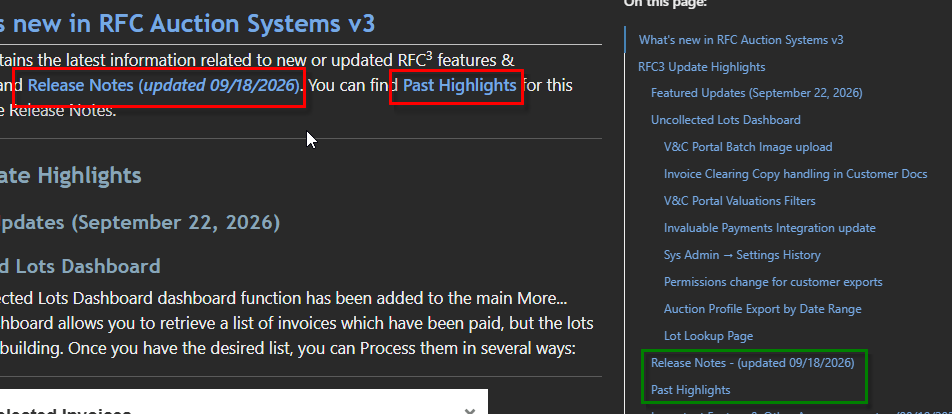
And here's the source as imported from WWHB (added line feeds here just to keep the code block from wrapping):
This page contains the latest information related to new or
updated RFC^3^ features & functionality,
and [Release Notes (*updated 09/18/2026*)](VFPS://Topic/_5PM0LMH0V#Release_Notes).
You can find [Past Highlights](VFPS://Topic/_5PM0LMH0V#Past_Highlights)
for this year below the Release Notes.
and
### <a name="Release_Notes">Release Notes</a> - *(updated 09/18/2026)*

### <a name="Past_Highlights">Past Highlights</a>

 re: Jump to bookmark/link anchor in topic is not working
 Rick Strahl
Richard Kaye
Sep 24, 2026 @ 06:38am
That's only for the previewer I think? It should work on the live site.
The issue is that local link navigation (#anchor links) don't work with the way the WebView is set up for navigation on its own. It handles Http and relative links fine but not anchor links. So the preview page intercepts the clicks.
The problem is that the side bar is injected after the page loads and in area that's not available at load time, so the link mapping doesn't work there.
I should take another look because that can probably be fixed by widening the link checking to page scope.
It should work on the live site, and - you really have to seriously resize the preview to see a wide enough window where the sidebar actually shows.
+++ Rick ---
re: Jump to bookmark/link anchor in topic is not working Richard Kaye
Rick Strahl
Sep 24, 2026 @ 08:45am
Nope. I thought it might have been the previewer as well but it only works from the On this page sidebar.
Here's the generated html:
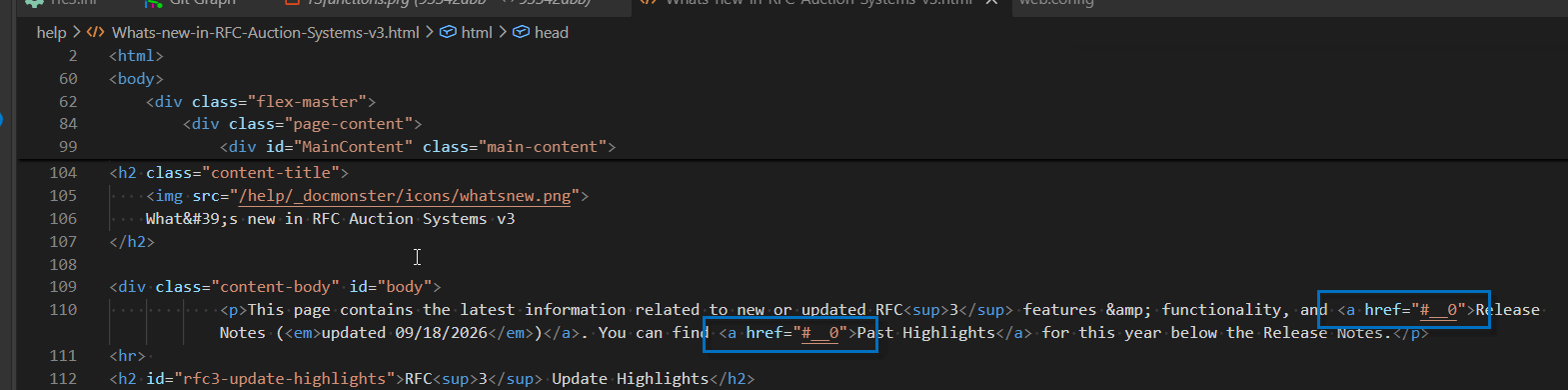
Here's the bookmark/anchor for release notes:

Here's the right hand sidebar (On this page):

re: Jump to bookmark/link anchor in topic is not working Rick Strahl
Richard Kaye
Sep 24, 2026 @ 10:13am
Not sure, what do those links look like in your topic?
+++ Rick ---
 re: Jump to bookmark/link anchor in topic is not working
 Richard Kaye
Rick Strahl
Sep 24, 2026 @ 11:17am
Here's the code from the DM-generated html instead of a screenshot:
<div class="content-body" id="body">
<p>This page contains the latest information related to new or updated RFC<sup>3</sup> features & functionality, and <a href="#__0">Release Notes (<em>updated 09/18/2026</em>)</a>. You can find <a href="#__0">Past Highlights</a> for this year below the Release Notes.</p>
Those anchor tags clearly aren't going to go anywhere useful. 😃
Here's the markdown source as text instead of a screenshot:
This page contains the latest information related to new or updated RFC^3^ features & functionality, and [Release Notes (*updated 09/18/2026*)](VFPS://Topic/_5PM0LMH0V#Release_Notes). You can find [Past Highlights](VFPS://Topic/_5PM0LMH0V#Past_Highlights) for this year below the Release Notes.
Is this what you wanted to see?
re: Jump to bookmark/link anchor in topic is not working Rick Strahl
Richard Kaye
Sep 24, 2026 @ 11:58am
This is after you generated the project? Or are you just looking at the Html file when in the editor?
A full render is required for some of the links to resolve properly due to the differences of how navigation works in the previewer vs a live site.
+++ Rick ---
re: Jump to bookmark/link anchor in topic is not working Richard Kaye
Rick Strahl
Sep 24, 2026 @ 12:23pm
Yes, that is after going through the generate cycle.
re: Jump to bookmark/link anchor in topic is not working Richard Kaye
Richard Kaye
Sep 25, 2026 @ 04:19am
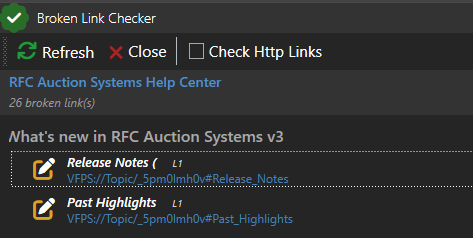
The broken link checker is correctly identifying these 2 links as ... broken. 😃
I noticed that the IDs did not match so I updated. It still says the links are broken. Note that this is after I updated the MD file and refreshed the link checker.
re: Jump to bookmark/link anchor in topic is not working Richard Kaye
Richard Kaye
Sep 25, 2026 @ 05:39am
I don't seem to be able to successfully create a topic link with a bookmark to another location on the page. But as mentioned earlier, the On this page RHS links work just fine.
re: Jump to bookmark/link anchor in topic is not working Rick Strahl
Richard Kaye
Sep 26, 2026 @ 07:08pm
It doesn't check the VFPS:// links - which are sort of supported as legacy help builder links - but not all features.
Use the dm-topic:// syntax instead. I think that is likely to work better. You should be able to just swap vfps:// with dm-topic:// if I remember right but try it on a single link before doing a wholesale change.
re: Jump to bookmark/link anchor in topic is not working Richard Kaye
Rick Strahl
Sep 28, 2026 @ 06:11am
Yeah , I did try that. I will go update them to use the dm-topic instead of VFPS because my OCD requires that. 😃
This also does not seem to go to an in-page bookmark. Unless I've got the syntax wrong. This is the source:
You can find [Past Highlights](dm-topic://_5pm0lmh0v#Past_Highlights) for this year below the Release Notes.
This is the target:
### <a name="Past_Highlights">Past Highlights</a>
Richard Kaye
Rick Strahl
Sep 28, 2026 @ 09:23am
A quick experiment seems to indicate that if I use the topic ID it works. Like this:
* [Terms](dm-topic://_5ow0ztewa)
But using the Topic/
re: Jump to bookmark/link anchor in topic is not working Rick Strahl
Richard Kaye
Sep 28, 2026 @ 07:05pm
First off - IDs are auto-generated for all headers, so you don't have to manually add anchors with names. Second the # finds Ids not anchors. That's probably something I should fix in the previewer, but it should work in the live site. If you change name= to id= in the anchor, does that work?
I can't check right now as I'm on the road, but I'm pretty sure the way the previewer navigates is it looks for Id tags only.
+++ Rick ---
re: Jump to bookmark/link anchor in topic is not working Richard Kaye
Rick Strahl
Sep 29, 2026 @ 02:41am
Thanks, Rick. Yes, I went through all my source and converted topic names to IDs for all dm-topic refs. Keep in mind that I'm starting from the exported WWHB json. One thing I will note about that is I did have a mix of name vs ID in WWHB, and they all got converted to use /Topic/name or id so I also had to edit the ID ones to remove the Topic path. IAC that's all good now, and the broken link checker was really helpful.
What is still a challenge is the ability to jump directly to a specific bookmark within the same page. The pattern in WWHB was id/topic name#bookmark name. The examples I've shown earlier in the thread do not work in either the DM previewer or the generated html in my help site. The links in the RHS do work. So when you're back in the saddle, it would be great to know what the proper markdown syntax is for an in-page bookmark. FWIW I tried, among many other things, adding an id inside {} to the markdown header and that also did not generate a working bookmark link.
re: Jump to bookmark/link anchor in topic is not working Rick Strahl
Richard Kaye
Sep 30, 2026 @ 10:06am
Took a look at the code and the topic lookup isn't in there. I don't think this worked in Help Builder either or if it did was different because the logic actually is the same.
I fixed it here, and it seems like it's working nicely now. It's a template update in docmonster.js...
Example:
https://markdownmonster.west-wind.com/docs/?topic=Embedding Links
+++ Rick ---
re: Jump to bookmark/link anchor in topic is not working Richard Kaye
Rick Strahl
Sep 30, 2026 @ 10:16am
Sounds promising. Let me know when there's an update to fetch. Or is there an experimental zip I can grab?
I had also created a separate thread for the ?topic= syntax.
re: Jump to bookmark/link anchor in topic is not working Rick Strahl
Richard Kaye
Sep 30, 2026 @ 10:44am
I've updated the download v0.5.5.1...
+++ Rick ---
re: Jump to bookmark/link anchor in topic is not working Richard Kaye
Rick Strahl
Sep 30, 2026 @ 11:27am
Got it. IIRC in the old world, there was some process to update templates. In DM it looks like there's an Update Output Scripts and Templates option on the Build menu. I assume i need to do that to get the updated docmaonster.js into my projects?
re: Jump to bookmark/link anchor in topic is not working Richard Kaye
Richard Kaye
Sep 30, 2026 @ 11:29am
And yes I can see that in Git. I'll let you know how I get on.
re: Jump to bookmark/link anchor in topic is not working Richard Kaye
Rick Strahl
Oct 8, 2026 @ 08:02am
OK. Back to this one. This is the last open item I had where WWHB worked but what was migrated to DM did not. I reviewed the new FAQ topic, and while it addresses topic name vs id, etc it did not cover how to go to in-page locations. The answer appears to be use standard html for an in-page link instead of the dm-topic syntax. At least that worked for me. 😃
For the lurkers, I changed
[Release Notes](dm-topic://_5pm0lmh0v#Release_Notes)
to
<a href="#Release_Notes">Release Notes</a>.
Then I changed the anchor below to
### <a id="Release_Notes">Release Notes</a>
re: Jump to bookmark/link anchor in topic is not working Rick Strahl
Richard Kaye
Oct 8, 2026 @ 08:25am
In document links should always be linked with HashTags like that.
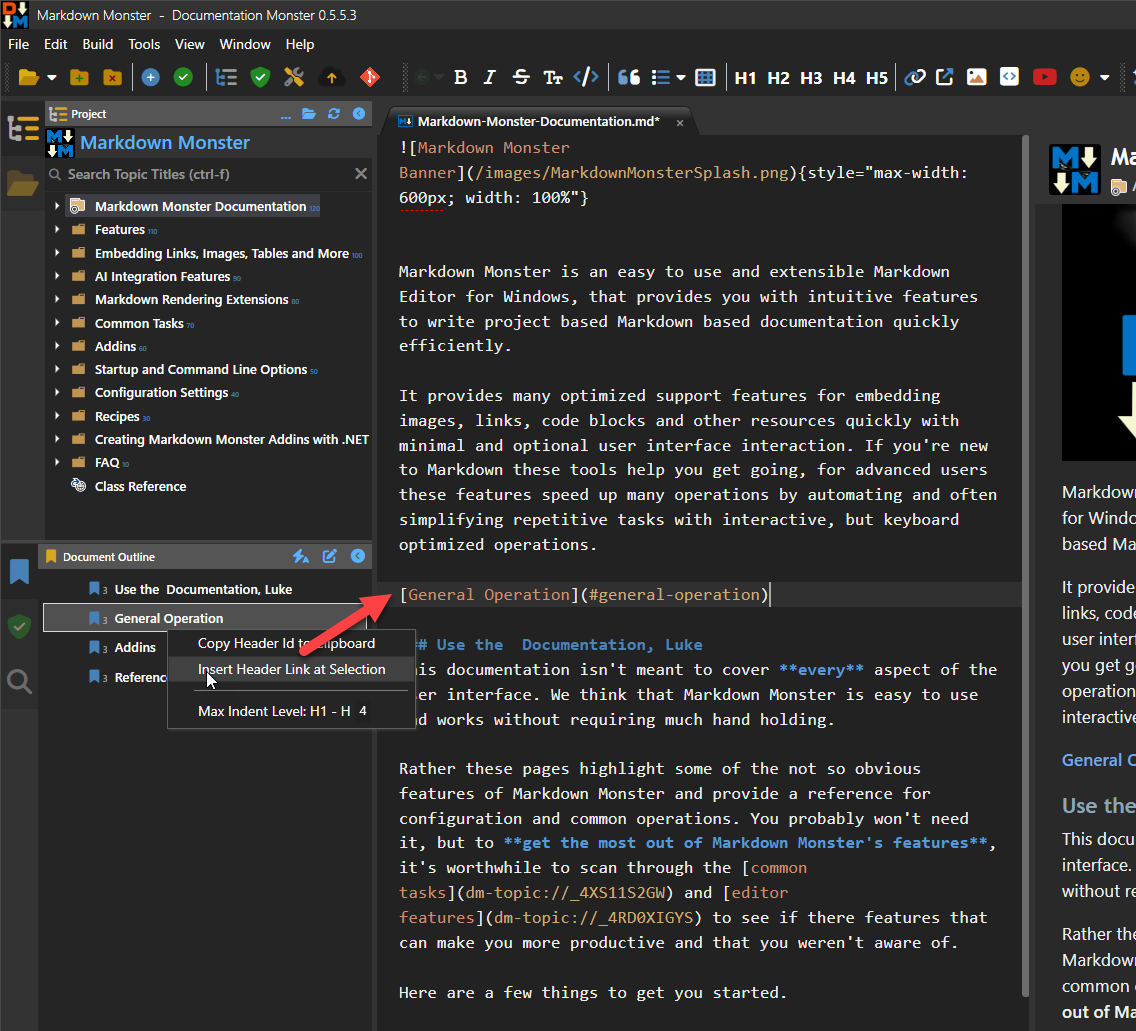
But... all headers are auto-id using a standard GitHub Markdown style formatting using snake case and you can use the Bookmarks toolbar to embed them (just like in Markdown Monster):
+++ Rick ---
re: Jump to bookmark/link anchor in topic is not working Rick Strahl
Richard Kaye
Oct 8, 2026 @ 08:28am
That said - I think separate topic navigation with a hashtag link does not work correctly. I have to look at that.
The syntax for that should be dm-topic:_123abc231#general-operation and that should work but I believe it does not as that hashtag is not properly passed forward in the generated link.
+++ Rick ---
re: Jump to bookmark/link anchor in topic is not working Richard Kaye
Rick Strahl
Oct 8, 2026 @ 09:14am
Ah. Import Header link at selection. That looks important. 😃
I guess what I've also been driving at with this is to get the DM way to accomplish an in-page link. It's not necessarily intuitive for those of us new to the product, and if the FAQ or other docs don't cover than it's a bit hit or miss.
The standard HTML worked but I'm happy to try the dm-topic syntax if you want.
re: Jump to bookmark/link anchor in topic is not working Rick Strahl
Richard Kaye
Oct 8, 2026 @ 09:17am
FWIW - I just added a display that shows the image Id in the header of the context menu to make it easier to see what the generated links look like without having to take an explicit copy or embed action.
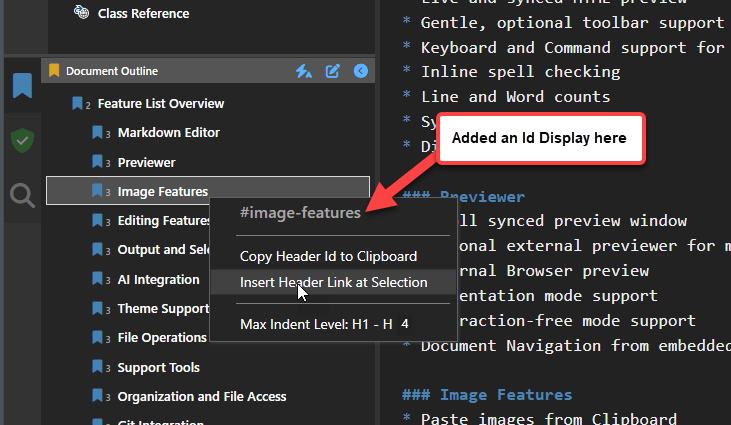
Also added to Markdown Monster...
+++ Rick ---